Saturday, February 08, 2020

Review of Java 13 "Preview Features" in Spring Boot app with Maven . . .

Writing code in Groovy for few years and now back to Java, I couldn't resist using one of the preview features added to Java 13 - Text Blocks. Multiline String literal is the most ugliest part of Java code polluted with escape characters and concatenation operator all over, to an extent that your brain cannot read the string actually. Writing a multiline XML/JSON string is a nightmare. There is no reason to live with such constraints in a language for this long. At last, Java 13 added support for multiline string as a preview feature. It's not going to go away but might go through some changes in future releases and is a pleasant to start using, infact. This blog post is not about text blocks, but several things that you need to do correctly in order to fully leverage preview features in a SpringBoot application with Maven as the build tool.

I was working on a Spring Boot micro-service app with Java 13 from ground up. I had to define a long String literal for a message. After enjoying Groovy's fantastic and superior support for defining multi-line text as a String for long enough, my eyes would certainly go blind if I do not leverage Java 13 Text Blocks in Java code for this. Thought it appears to be simple to just enable Java language preview feature with --enable-preview flag, in reality it goes beyond that simplicity. Not a surprise, after all technology only gets complex ;)

Environment: Java 13.01, Spring Boot 2.2.4.RELEASE, Maven 3.6.2, IntelliJ IDEA ULTIMATE 2019.3 on macOS High Sierra 10.13.6

Java 13 --enable-preview language flag

This is the flag you need to set for enabling Java 13 preview features, both for compiler (javac) and JVM launcher (java). Without this flag your code will not get compiled or run. With this flag you will still see a warning but can ignore safely. In order to use Java 13 features in a SpringBoot app with Maven, you need one or many or all of the following.

IntelliJ IDEA Setup

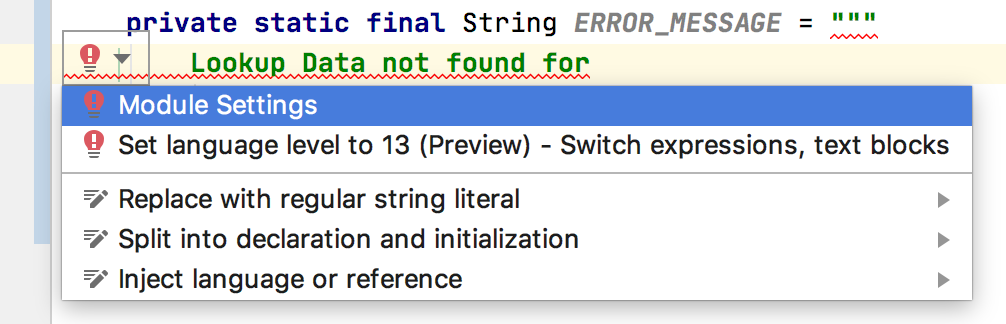
The moment I declared a String and assigned a multiline text literal, IntelliJ got unhappy. A warning bulb popped up and the message was: Text block literals are not supported at language level '13'. I did not understand what the message was saying but the link to Module settings took me to my API module level settings which was like:


It would have been much useful if the message was: Text block literals are not supported at language level '13 (No Preview)' and that current option chosen was: 13 (No Preview) language features. When I pulled down the option list, there I saw the 13 (Preview) option right below it:


That's IntelliJ way of setting the compiler flag --enable-preview to enable preview feature at the module level, if your are coding in a module in a multi-module maven project. Once I switched to the (Preview) one, IntelliJ was happy to compile my code.

NOTE: If you have a multi-module Maven project, you may need to set this Language level at the project level as well as at the each module level.

Maven Build Setup

IDE compiles code as we go on writing code and helps us with missing configurations and fixing errors. But the build system like Maven or Gradle is the one used at the end to clean, compile, package and run the app. Of course, maven build fails without additional setup for enabling preview features. The config setup needs the --enable-preview flag at few places depending on what plugins you have in it's pom.xml file. I had at least four places where I had to use this flag with some additional argument setup as well to get this feature fully enabled for my Spring Boot app.

1. Maven Compiler Plugin

Maven Compiler plugin compiles the project source code. You need to have an additional --enable-preview compiler argument in it's configuration to enable preview features as shown below:

<plugin> <groupId>org.apache.maven.plugins</groupId> <artifactId>maven-compiler-plugin</artifactId> <version>3.8.1</version> <configuration> <release>13</release> <compilerArgs> <arg>--enable-preview</arg> <arg>-Xlint:all</arg> </compilerArgs> </configuration> </plugin>

2. Maven Surefire Plugin

Surefire plugin is used during test phase to run unit tests. You need to have an additional --enable-preview compiler argument in it's configuration to enable preview features. In addition to this you also need to have ${argLine} without which you will not have code coverage reports generated if you are using code coverage libraries like JaCoCo. An example configuration setup is shown below:

<!-- surefire for unit tests --> <plugin> <groupId>org.apache.maven.plugins</groupId> <artifactId>maven-surefire-plugin</artifactId> <version>2.22.2</version> <configuration> <argLine>${argLine} --enable-preview</argLine> </configuration> <dependencies> <dependency> <groupId>org.apache.maven.surefire</groupId> <artifactId>surefire-junit47</artifactId> <version>2.22.2</version> </dependency> </dependencies> </plugin>

3. Maven Failsafe Plugin

Failsafe plugin is used to during test phase to run integration tests. You need to have an additional --enable-preview compiler argument in it's configuration to enable preview features. In addition to this you also need to have ${argLine} without which you will not have code coverage reports generated if you are using code coverage libraries like JaCoCo. An example configuration  setup is shown below:

<!-- failsafe for integration tests --> <plugin> <groupId>org.apache.maven.plugins</groupId> <artifactId>maven-failsafe-plugin</artifactId> <version>2.22.2</version> <executions> <execution> <goals> <goal>integration-test</goal> <goal>verify</goal> </goals> </execution> </executions> <configuration> <argLine>${argLine} --enable-preview</argLine> <additionalClasspathElements> <additionalClasspathElement>${basedir}/target/classes</additionalClasspathElement> </additionalClasspathElements> <includes> <include>**/*IT.java</include> </includes> </configuration> </plugin>

4. Springboot Maven Plugin

Springboot Maven plugin runs your application by launching the embedded Tomcat Server and JVM. You need to tell the JVM launcher to enable preview features by setting the flag as shown below:

<plugin> <groupId>org.springframework.boot</groupId> <artifactId>spring-boot-maven-plugin</artifactId> <version>${spring.boot.version}</version> <executions> <execution> <id>repackage</id> <goals> <goal>repackage</goal> </goals> </execution> <execution> <!-- Useful info on /actuator/info --> <id>build-info</id> <goals> <goal>build-info</goal> </goals> </execution> </executions> <configuration> <mainClass>com.giri.api.Application</mainClass> <jvmArguments>${argLine} --enable-preview</jvmArguments> </configuration> </plugin>


TIP

In IntelliJ IDEA, if you do not have the (Preview) language level set, and if you mouseover the multiline text the warning message shown up like below is bit misleading.


However, when you click on the multi-line literal text, the error shown as below is more meaningful:

References

Monday, January 20, 2020

The Forgotten Maven . . .

It's been more than a decade since I used Maven, or Maven used me. I was quite impressed with it's dependency management and convention over configuration features first time when I tried and introduced it in a project. But it was not a long-lasting impression. Those were the days when Ant was the de-facto standard build system for Java projects, XML/XSD/XSLT were pleasing every developer, and there wasn't any build system with dependency management capability.

Then I moved to a team where Ant + Ivy was chosen standard in Maven era. Huh...what a pain to go back to Ant and start writing build scripts in XML from scratch with Ivy as the dependency manager and your own conventions & configurations for a project! Later, I was privileged at the same place to revamp their tech-stack for one of the new projects, changing from AccuRev to Git, Java to Java + Groovy, Struts to Spring MVC, WebLogic to Tomcat, no CI/CD to full Jenkins CI/CD pipeline, and Ant + Ivy to Gradle. The last one: Ant + Ivy to Gradle, was a joyful great leap forward. I was very impressed with the depth of Gradle documentation. I started advocating by popularizing the same phrase borrowed from Gradle docs, "Next Generation Build System". Then I chose and moved onto Grails projects. For about 5 years, I was living in a very happy world of Groovy, Grails and Gradle. My vision got better with no visual noise and clutter ;)

Back to the Future

Now I am back to Java, Spring Boot tech space where Maven is the chosen standard build system. Whenever I open pom.xml file in IDE, my eyes suddenly get blurry and my fingers start to slide on the trackpad making the screen scroll up and down. "Welcome back!", I say to myself as this is my choice to move back to Java ;)

Lately, I was going through the steps for building and running an existing multi-module project (multi-project in Gradle). A step describing to install specific version of maven paused me. Also, to run maven-goals (equivalent to gradle-tasks) of a specific module (project in Gradle) in a multi-module (multi-project in Gradle) proejct, I had to cd into it to run it's goals. My immediate reaction was to google and explore these two features: 1) Multi-module builds 2) Maven wrapper. Going forward, I would apply these two to every maven build-based project.

Environment: Java 13, Spring Boot 2.2.3, Maven 3.6.2 on MacOS High Sierra 10.13.6

1. Maven Wrapper (similar to Gradle wrapper)

Working with Gradle based Grails projects, I am used to Gradle wrapper which is preferred way to go without having Gradle or a specific version of Gradle installed to build and run your project. I was happy to find something similar exists now for Maven world. If one exists, why not use it? I started using it. Conceptually, it is very similar to Gradle wrapper.

2. Multi-module maven build (similar to multi-project gradle build)

One of the pain points I had with a multi-module project was finding how to run maven goals in the context of a specific module (project) from the root project directory. But finding a way to do this took little more time than expected even when we have stackoverflow around to readily help finding a way. If a maven expert reads this and says, "Hey stupid, this is so obvious and maven users already know how to do this even in sleep.", I am not ashamed to take it with a smile ;)

Using Maven Wrapper in a Multi-module maven Project

In a multi-module maven project, apply maven wrapper at the root project level. It generates a couple of command scripts (mvnw, mvnw.cmd) and .mvn/wrapper dir used by the wrapper scripts to go fetch, install and run maven if it is not present on your system.

With the following multi-project structure (my-service is the root project, my-service-api is a Spring Boot project):

. └── my-service ├── my-service-api │   └── pom.xml ├── my-service-lib │   └── pom.xml └── pom.xml


Run the following wrapper plugin goal from the root project dir: my-service (of course, for running this, you need to have maven installed) to add maven wrapper support to your multi-module project:
mvn -N io.takari:maven:wrapper

The above command generates wrapper specific files and directory that are highlighted and shown below:
. └── my-service ├── .mvn │   └── wrapper │   ├── MavenWrapperDownloader.java │   ├── maven-wrapper.jar │   └── maven-wrapper.properties ├── mvnw ├── mvnw.cmd ├── my-service-api │   └── pom.xml ├── my-service-lib │   └── pom.xml └── pom.xml

All files added by the wrapper plugin should also be checked-in and live in the repo along with project files. Now, if a new developers check out the project, they don't need to install maven to build and run the project on their systems. Simply run maven goals from the root project like, but instead of running mvn command which requires maven to exists, happily run ./mvnw wrapper script.

Maven multi-project builds can be run from either the root project or from a specific module. When run from the root, it builds all sub-modules. When run from a specific module, it just builds that module. The root level pom.xml defines modules and other common configurations available for all modules. A module specific pom.xml defines build configuration for that specific module.

Without wrapper support and maven installed, or with wrapper support and maven not installed, one can run multi-project builds in 3 ways:
    1. Build from the root, which builds all modules (sub-projects).
    2. Build from the root, but a specific module's specific goal.
    3. Build from a specific module, cd into a specific module and run that module's specific goal.

1. Build from the root project

// from the root project $ cd my-service // with maven (installed) my-service$ mvn clean install // with maven wrapper (maven not installed) my-service$ ./mvnw clean install

2. Build a specific module from the root project

// from the root project $ cd my-service // with maven (installed) my-service$ mvn -pl my-service-api clean install spring-boot:run -Dspring-boot.run.profiles=local
// with maven wrapper (maven not installed) my-service$ ./mvnw -pl my-service-api clean install spring-boot:run -Dspring-boot.run.profiles=local

-pl <sub-module-name-the-tasks-to-be-run-for> is the key command option to know for this.

3. Build specific module's goal from the module

// from the module $ cd my-service-api // with maven (installed) my-service-api$ mvn -pl clean install spring-boot:run -Dspring-boot.run.profiles=local
// with maven wrapper (maven not installed) my-service-api$ ../mvnw clean install spring-boot:run -Dspring-boot.run.profiles=local

TIP

mvn -h or mvn --help lists all command line options.

Here is how the help looks for -pl option:
-pl,--projects <arg> Comma-delimited list of specified reactor projects to build instead of all projects. A project can be specified by [groupId]:artifactId or by its relative path

I got fooled and stayed away by the buzz word reactor projects when I first tried looking for some help before seeking further help and finding how-to on stackoverflow :(

1. Newer versions of Maven - Wrapper support

With newer versions of Maven, adding wrapper to maven project is easy, just run the following command from the project root folder:
mvn wrapper:wrapper // add wrapper support to project ./mvnw -v // check maven version used by wrapper ./mvnw validate // validate project

To upgrade maven wrapper to newer version of maven, just run the following command and checkin all modified files into your source repo:
./mvnw wrapper:wrapper -Dmaven=3.8.6 // upgrade maven wrapper to newer version of maven ./mvnw -v // check maven version used by wrapper

2. Show Maven Version when maven commands are run using Maven wrapper

Add file under .mvn directory of your project named: maven.config containing --show-version and you will have both Maven version and Maven home directory displayed in the build output in the beginning.
# show Maven version, Maven home, Java version, and OS details --show-version

3. Show Java Version when maven commands are run using Maven wrapper

Add file under .mvn directory of your project named: jvm.config containing --show-version and you will have Java version displayed in the build output in the beginning.

Also, the following config entries in the above mentioned jvm.config file will be useful to show date-time of build console log lines and thread name as well.

-Dorg.slf4j.simpleLogger.showDateTime=true -Dorg.slf4j.simpleLogger.dateTimeFormat=HH:mm:ss -Dorg.slf4j.simpleLogger.showThreadName=true --show-version

Summary

After happily living in Groovy/Gradle/Grails world for about a decade, whether I like it or not, I am back to Java/Maven and I am using maven again. Oops, maven started using me again ;)

References


Friday, October 19, 2018

Navigate safely with null-safe operator for Maps in Groovy . . .

It is not overstating to say that, NullPointerException (known as NPE), in Java is annoying and dreaded. ;) So much of noisy if conditional check code-blocks get added to main logic simply as a way to avoid it safely. Missing these safety if checks will result into run-time NullPointerException indicating a bug. Java doesn't provide any elegant syntax to deal with annoyance.

Groovy offered null-safe operator ( ?. ) right from the beginning. Recent JVM languages started offering ways to deal with it safely with which Java developers are falling in love. But, what Groovy offers with null-safe operator ( ?. ), is the most elegant syntax for safely navigating an object graph.

Groovy also offers consistent way of referring element in a collection with subscript operator ( [] ). The subscript operator is a short-hand notation for groovy's added getAt() method for collections in addition to Java provided get() method. Accessing elements of Arrays, Lists, Sets and Maps is consistent with subscript operator.

This safe navigation operator can't be used with collections to access elements safely with subscript notation. For instance, myList[0] to get first element from the list throws NPE when myList variable itself is null. Whereas, directly using the underlying Groovy provided method, myList?.getAt(0) is safer way to access first element without causing dreaded NPE. Java provided get(n) also can be used safely with ?. only for Arrays and Lists, but beware that it throws run-time IndexOutOfBoundsException if subscript index goes beyond the size, where Groovy's getAt(n) returns null in this case.

However, for Maps, Groovy offers additional notation (property notation) to reference key to get it's value. Unlike, subscript notation, this additional notation offers null-safety.

Environment: Groovy 2.4.15, Java 8 on MacOS High Sierra 10.13.6

Example code

Map nullMap = null // calling getAt() method is null-safe anyway, as it is groovy's way of safely navigating object graph assert nullMap?.getAt('name') == null /* * Notation-1: Subscript notation * - Null-unsafe way of referencing key * - Throws NullPointerException */ try { assert nullMap['name'] == null // key literal } catch(NullPointerException npe) { assert npe.message == "Cannot get property 'name' on null object" } String key = 'name' try { assert nullMap[(key)] == null // when value of variable is the key } catch(NullPointerException npe) { assert npe.message == "Cannot get property 'name' on null object" } /* * Notation-2: Property notation * Null-safe way of referencing key * Doesn't throw NullPointerException */ assert nullMap?.name == null // key literal assert nullMap?."$key" == null // when value of variable is the key

Summary

So, for Maps, there are 3 options, where String ABCD is the key:
  • Subscript notation ( myMap['ABCD'] ) - can't use null-safe operator and hence can get NPE
  • Use underlying method directly ( myMap?.getAt('ABCD') ) - can use null-safe operator but is verbose
  • Property notation ( myMap?.ABCD) - can use null-safe operator and is more readable.
I got into this trap by using subscript operator ( [] ) few times in the past, and hence sharing it in this post.