Showing posts with label JaCoCo. Show all posts

Sunday, September 15, 2024

Spring Code TIP-1: Get code coverage for the main method in Spring Boot application . . .

Setting up a new Spring boot project is made trivial by the Spring Initializer. IDEs like IntelliJ has integrated support for this as well. The application generated by this initializer contains three files under src.
    1) The application file (e.g. DemoAppliction.java) is Spring Boot main class that bootstraps the project.
    2) A properties file (application.properties) is the application configuration file.
    3) A test-case file (DemoApplictionTests.java). 

The main application file looks like:
package com.example.demo; import org.springframework.boot.SpringApplication; import org.springframework.boot.autoconfigure.SpringBootApplication; @SpringBootApplication public class DemoApplication { public static void main(String[] args) { SpringApplication.run(DemoApplication.class, args); } }
The SpringApplication.run(DemoApplication.class, args) performs bootstrapping, creates application context, and runs the application.

The configuration file looks like:
spring.application.name=demo

The test-case looks like:
package com.example.demo; import org.junit.jupiter.api.Test; import org.springframework.boot.test.context.SpringBootTest; @SpringBootTest class DemoApplicationTests { @Test void contextLoads() { } }
This is in fact a simple yet very useful test class and I would keep it around. The is an integration test-case that ensures that the application context loads successfully. If there are any issues this test fails. So, this can be treated like a integration smoke-test for your application. I would rename that test method name to smokeTest_contextLoads().

Spring Code TIP - Code coverage

However, once you progress on with the application and have code coverage check applied using build system like maven and its plugins Surefire, Failsafe and JaCoCo plugins, the main method is left uncovered by this test-case. Little strange!

Having a main method in the application supported by integrated test-case, one expects that the main method is invoked by the test-case. The annotation @SpringBootTest by default has this turned off. Hence @SpringBootTest calls SpringApplication.run(DemoApplication.class, args) and not the main method. So, in order to get the main method called instead when the test-case is run, we need to explicitly set a property. Once this is set, the test-case invokes the main method and the main method gets the code coverage.

The property is shown below to get the test coverage for the main method.
@SpringBootTest(useMainMethod = SpringBootTest.UseMainMethod.ALWAYS)

Not just for the code coverage, you might also want to use the useMainMethod property in scenarios where your application's main method performs additional setup or configuration that is necessary for your tests as well.

Summary

The useMainMethod property of the @SpringBootTest annotation allows you to control whether the main method of your application is invoked to start the Spring Boot application context during testing. By default, useMainMethod is set to UseMainMethod.NEVER, but you can set it to UseMainMethod.ALWAYS or UseMainMethod.WHEN_AVAILABLE to ensure that the main method is called during testing.

Thursday, August 05, 2021

Maven - multi-module Java project code coverage . . .

In addition to developing, building & deploying modern Java applications is also a developers' concern. Build tools come with a promise to save developers' time. But often times they suck developers in. Maven is known for that ;)

Choosing the right building tool before you even start an application/project is a standard practice these days. In modern Java world, the two popular build system choices are: Maven and Gradle. Though Gradle started as the "Next Generation Build Tool" with groovy programming language and well designed DSL to write build scripts, and by addressing pitfalls of Maven, maven still rules modern Java world with the legacy XML (Extensible Markup Language), which is not a programming language and is only good for structured data management. The modern software principle "as code" applied to everything these days, even to infrastructure, still doesn't apply to Maven build scripts.

A multi-module project is inevitable if you build any application with modularity and reusability. Maven poses great many challenges in this use-case. There are solutions available for every issue, but you end up spending too much time reading the poor documentation again and again scratching your head, doing more of the same with plugins documentations, and even more of the same in the form of question & answers on the stackoverflow. Clearly, this is not the way, but unfortunately is the way to find solutions, these days.

This post is the result of a 3-day fight with Maven in getting the multi-module code coverage working in a Maven multi-module project. The following 3 maven plugins are in main focus in this are(n)a:
Environment: Java 16, Spring Boot 2.5.3 on macOS Catalina 10.15.7

The Problem Scenario - code in one module, test-cases in another module

It is quite common in multi-module project to have code in one module, and some test-cases if not all in other module(s). For instance, a multi-module maven project with a sharable domain module, a sharable services module and an API micro-service application module (spring-boot based) is a best example of this scenario.

In this scenario, for example, the domain model code can get it's code coverage from unit test-cases as both source code and test-cases reside in the same module. The Maven Jacoco code coverage plugin works quite well in this case. But, it could be bit hard to write integration test-cases for the services module as it requires spring application context and spring-boot configurations. So, the API application module will definitely have a set of integration test-cases as it is a spring boot application with spring context and configurations available. This is the case that requires a better solution for generating code coverage reports by covering the multi-module distributed application code with distributed test-cases.

The two key-points in this scenario are:
  1. Test-cases in one module (API application) covering code in other module (services/domain) in addition to the other module's own code coverage.
  2. An individual module-wise code coverage report for all the modules with their own code coverage by their own test-cases and coverage threshold checks.
  3. A overall consolidated/aggregated but module-wise code coverage report for the entire application code and a code coverage threshold check for the overall code in all modules.

The Solution

The JaCoCo maven plugin from version 0.7.7 onwards offers a new report-aggregate goal. This is the goal that can be leveraged to get an aggregated code coverage report generated. However, it is not straight forward getting this done.

The following is an example multi-module project structure, my-app is the root project, my-app-api is a Spring Boot application with my-app-domain and my-app-services modules that it depends on:
. └── my-app ├── my-app-api │ └── pom.xml ├── my-app-domain │ └── pom.xml ├── my-app-services │ └── pom.xml ├── my-app-code-coverage │ └── pom.xml └── pom.xml

The project's root module my-app's pom.xml file looks something as shown below:
... <modules> <module>my-app-api</module> <module>my-app-domain</module> <module>my-app-services</module> <module>my-app-code-coverage</module> </modules> ... <properties> <jacoco.plugin.version>0.8.7</jacoco.plugin.version> <surefire.plugin.version>2.22.2</surefire.plugin.version> <failsafe.plugin.version>2.22.2</failsafe.plugin.version> </properties> ... <build> <plugins> <!-- jacoco for code coverage --> <plugin> <groupId>org.jacoco</groupId> <artifactId>jacoco-maven-plugin</artifactId> <version>${jacoco.plugin.version}</version> <executions> <!-- jacoco agent for unit-tests code coverage --> <execution> <id>initialize-coverage-before-unit-test-execution</id> <goals> <goal>prepare-agent</goal> </goals> </execution> <!-- jacoco agent for integration-tests code coverage --> <execution> <id>initialize-coverage-before-integration-test-execution</id> <goals> <goal>prepare-agent</goal> </goals> <phase>pre-integration-test</phase> <configuration> <propertyName>integrationTestCoverageAgent</propertyName> </configuration> </execution> </executions> </plugin> <!-- UNIT tests--> <plugin> <groupId>org.apache.maven.plugins</groupId> <artifactId>maven-surefire-plugin</artifactId> <version>${surefire.plugin.version}</version> <configuration> <excludes> <exclude>**/*IT.java</exclude> </excludes> <!-- NOTE: In case if you need to pass in special JVM argumengts for instance say, to enable Java language preview features, the following is how it MUST be done. The @{argLine} goes through late evaluattion that points to Jacoco agent JVM argument followed by any additional JVM arguments of your choice each separated by space. The expression @{argLine} retains Jacoco JVM agent argument. Without this any additional JVM arguments that you add will be taken but you lose Jacoco's argument causing to lose code coverage report files and hence the coverage report. --> <argLine>@{argLine} --enable-preview</argLine> </configuration> </plugin> <!-- INTEGRATION tests --> <plugin> <groupId>org.apache.maven.plugins</groupId> <artifactId>maven-failsafe-plugin</artifactId> <version>${failsafe.plugin.version}</version> <executions> <execution> <id>integration-tests</id> <goals> <goal>integration-test</goal> <goal>verify</goal> </goals> <configuration> <additionalClasspathElements> <additionalClasspathElement>${basedir}/target/classes</additionalClasspathElement> </additionalClasspathElements> <includes> <include>**/*IT.java</include> </includes> <excludes> <exclude>com.my.api.service.MyNotUsedServiceIT</exclude> </excludes> <!-- NOTE: When running as a Maven plugin, the JaCoCo agent configuration is prepared by invoking the prepare-agent or prepare-agent-integration goals, before the actual tests are run. This sets a property named argLine which points to the JaCoCo agent, later passed as a JVM argument to the test runner. --> <argLine>${integrationTestCoverageAgent}</argLine> <!-- NOTE: In case if you need to pass in special JVM argumengts for instance say, to enable Java language preview features, the following is how it MUST be done. The @{argLine} goes through late evaluattion that points to Jacoco agent JVM argument followed by any additional JVM arguments of your choice each separated by space. The expression @{argLine} retains Jacoco JVM agent argument. Without this any additional JVM arguments that you add will be taken but you lose Jacoco's argument causing to lose code coverage report files and hence the coverage report. --> <argLine>@{argLine} --enable-preview</argLine> </configuration> </execution> </executions> </plugin> </plugins> </build> ...

Notable points from the above build file around code coverage are:
  • The JaCoCo plugin configuration for code coverage with two execution configurations for unit and integration tests coverage. Make a note of the configuration <propertyName>integrationTestCoverageAgent</propertyName >, it can be any string. The same name should be passed as an argument (argLine) for failsafe configuration. Also, make sure that you retain Jacoco JVM agent argument pointed to by Jacoco added argLine property to be evaluated late in the game as the recommended expression @{argLine} in case if you have additional JVM arguments to be passed for test executions.
  • The surefire plugin configuration for unit tests.
  • The failsafe plugin configuration for integration tests.
The domain my-app-domain module's pom.xml file is something like shown below:
... <build> <plugins> <plugin> <groupId>org.jacoco</groupId> <artifactId>jacoco-maven-plugin</artifactId> <version>${jacoco.plugin.version}</version> <executions> <execution> <id>generate-code-coverage-report</id> <phase>test</phase> <goals> <goal>report</goal> </goals> </execution> <execution> <id>perform-code-coverage-threshold-check</id> <goals> <goal>check</goal> </goals> <configuration> <!-- Set Rule to fail build if code coverage is below certain threshold --> <rules> <rule implementation="org.jacoco.maven.RuleConfiguration"> <element>BUNDLE</element> <limits> <limit implementation="org.jacoco.report.check.Limit"> <counter>INSTRUCTION</counter> <value>COVEREDRATIO</value> <minimum>0.60</minimum> </limit> </limits> </rule> </rules> </configuration> </execution> </executions> </plugin> ... </plugins> ... </build> ...

The api my-app-api module's pom.xml file is something like shown below, very similar to my-app-domain module:
... <build> <plugins> <plugin> <groupId>org.jacoco</groupId> <artifactId>jacoco-maven-plugin</artifactId> <version>${jacoco.plugin.version}</version> <executions> <execution> <id>generate-code-coverage-report</id> <phase>test</phase> <goals> <goal>report</goal> </goals> </execution> <execution> <id>perform-code-coverage-threshold-check</id> <goals> <goal>check</goal> </goals> <configuration> <!-- Set Rule to fail build if code coverage is below certain threshold --> <rules> <rule implementation="org.jacoco.maven.RuleConfiguration"> <element>BUNDLE</element> <limits> <limit implementation="org.jacoco.report.check.Limit"> <counter>INSTRUCTION</counter> <value>COVEREDRATIO</value> <minimum>0.80</minimum> </limit> </limits> </rule> </rules> </configuration> </execution> </executions> </plugin> ... </plugins> ... </build> ...

Notable points from the above two modules' build files around code coverage are:
  • The JaCoCo plugin's additional configuration for code coverage with execution configurations for code coverage report (goal: report) and code coverage threshold check (goal: check) with a threshold ration number (0.60 for domain and 0.80 for api).
  • No surefire and failsafe configurations are needed as they are available in sub-modules from the root/main module's build configuration.
The new modulemy-app-code-coverage module's pom.xml file for consolidated code coverage is like shown below:
<?xml version="1.0" encoding="UTF-8"?> <project xmlns="http://maven.apache.org/POM/4.0.0" xmlns:xsi="http://www.w3.org/2001/XMLSchema-instance" xsi:schemaLocation="http://maven.apache.org/POM/4.0.0 http://maven.apache.org/xsd/maven-4.0.0.xsd"> <parent> <groupId>com.giri</groupId> <artifactId>my-app</artifactId> <version>1.0.0-SNAPSHOT</version> </parent> <modelVersion>4.0.0</modelVersion> <artifactId>my-app-code-coverage</artifactId> <packaging>pom</packaging> <name>My Api App Service multi-module code coverage</name> <description>Module for My Api App multi-module code coverage across all modules</description> <properties> <code.coverage.project.dir>${basedir}/../</code.coverage.project.dir> <code.coverage.overall.data.dir>${basedir}/target/</code.coverage.overall.data.dir> <maven-resources-plugin.version>3.2.0</maven-resources-plugin.version> </properties> <dependencies> <dependency> <groupId>com.giri</groupId> <artifactId>my-app-domain</artifactId> <version>${project.version}</version> <scope>compile</scope> </dependency> <dependency> <groupId>com.giri</groupId> <artifactId>my-app-services</artifactId> <version>${project.version}</version> <scope>compile</scope> </dependency> <dependency> <groupId>com.giri</groupId> <artifactId>my-app-api</artifactId> <version>${project.version}</version> <scope>compile</scope> </dependency> </dependencies> <build> <plugins> <!-- required by jacoco for the goal: check to work --> <plugin> <groupId>org.apache.maven.plugins</groupId> <artifactId>maven-resources-plugin</artifactId> <version>${maven-resources-plugin.version}</version> <executions> <execution> <id>copy-class-files</id> <phase>generate-resources</phase> <goals> <goal>copy-resources</goal> </goals> <configuration> <overwrite>false</overwrite> <resources> <resource> <directory>../my-app-domain/target/classes</directory> </resource> <resource> <directory>../my-app-services/target/classes</directory> </resource> <resource> <directory>../my-app-api/target/classes</directory> </resource> </resources> <outputDirectory>${project.build.directory}/classes</outputDirectory> </configuration> </execution> </executions> </plugin> <plugin> <groupId>org.jacoco</groupId> <artifactId>jacoco-maven-plugin</artifactId> <version>${jacoco.plugin.version}</version> <executions> <execution> <id>report-aggregate</id> <phase>verify</phase> <goals> <goal>report-aggregate</goal> </goals> </execution> <execution> <id>merge-results-data</id> <phase>verify</phase> <goals> <goal>merge</goal> </goals> <configuration> <fileSets> <fileSet> <directory>${code.coverage.project.dir}</directory> <includes> <include>**/target/jacoco.exec</include> </includes> </fileSet> </fileSets> <destFile>${code.coverage.overall.data.dir}/aggregate.exec</destFile> </configuration> </execution> <execution> <id>perform-code-coverage-threshold-check</id> <phase>verify</phase> <goals> <goal>check</goal> </goals> <configuration> <dataFile>${code.coverage.overall.data.dir}/aggregate.exec</dataFile> <rules> <rule> <element>BUNDLE</element> <limits> <limit> <counter>INSTRUCTION</counter> <value>COVEREDRATIO</value> <minimum>0.90</minimum> </limit> </limits> </rule> </rules> </configuration> </execution> </executions> </plugin> </plugins> </build> </project>

Notable points from the above build file around code coverage are:
  • List all modules that the code lives in as dependencies for this module to get the consolidated report generated.
  • Collect all compiled class files from all modules under this module's build directory. This requires maven-resource-plugin and is required for JaCoCo goal: check for coverage threshold check.
  • JaCoCo plugin configuration with three executions with goals: report-aggregate, merge, and check for code coverage threshold check.
  • The JaCoCo execution goal: report-aggregate is the one that gets aggregate reports generated.
  • The JaCoCo goal: merge is needed to merge all modules' jacoco.exec files to be merged into one file.
  • And, of course, the JaCoCo goal: check is needed for the overall code coverage threshold check and a threshold ratio number (0.90) which is different than any of the individual module's threshold ration number.
With the above maven module build files, from the root project just run: mvn clean install or mvn clean verify. It cleans, compiles code, runs all test-cases, and generates code coverage reports in each module's build directory: target/site/jacoco. Each module's coverage report shows code coverage attained from test-cases existing within that module. This number could be different (less or equal) for the same module in the overall code coverage report. It also, generates an overall aggregated code coverage report in the newly added module's build directory: my-app-code-coverage/target/site/jacoco-aggregate. The overall code-coverage generates module-wise code coverage with the overall coverage threshold level checked.

TIPS

  • Have plugin configurations in the main/root project pom.xml file so that they are available to sub-modules. Only overwrite or add things that are necessary for the sub-module. For example the report goal configuration for JaCoCo in each sub-module and report-aggregate goal configuration for the overall code-coverage module.
  • The main/root project can define common code coverage configurations & executions for JaCoCo, surefire and failsafe plugins for all modules with coverage threshold check value set to 0.0 in the root with sub-modules overriding that property with their specific values. That way build scripts can follow the DRY principle.
  • It is good to have each module report generated in it's build taget to see the code coverage of the module by it's own test-cases though the special overall code coverage module generates reports for the overall coverage for all modules.
  • If there is any module that contains code but not test-cases due to any limitations like not having needed spring application context, and boot configurations, then that module's build file (pom.xml) doesn't need JaCoCo additional configuration for goal: report.
  • Another helpful maven goal is help:effective-pom. By running this command: mvn help:effective-pom for any sub-module, you can see and verify the effective pom (XML) with all parent inherited plugins and properties resolved, so that you don't need to do any guess work. This is very useful in multi-module builds to investigate any issues.

GOTCHAS

  • If surefire or failsafe plugins do not run unit & integration test-cases and do not leave a clue even when run in debug mode with mvn -X option, just try adding junit dependency surefire-junit47 as described in the plugin documentation to specify the test-framework provider.
  • For passing additional JVM arguments like --enable-preview or anything else, make sure to use the expression ${argLine} to retain Jacoco JVM agent argument along with your additional arguments. Missing that expression will miss code coverage and it's hard figuring out.
  • With Java 16, you might run into IllegalClassFormatException if your integration test-cases hit any code that uses reflection. The test-cases pass and they get the correct code coverage. This exception in the build output can just be treated as a misleading noise and can be filtered by excluding all those classes that are involved in the reflection. For instance an exception like: java.lang.instrument.IllegalClassFormatException: Error while instrumenting com/giri/app/util/MyClassOneMethodAccess. can be filtered by adding <excludes> to the JaCoCo plugin configuration as shown below:
<build> <plugins> <!-- jacoco for code coverage --> <plugin> <groupId>org.jacoco</groupId> <artifactId>jacoco-maven-plugin</artifactId> <version>${jacoco-maven-plugin.version}</version> <configuration> <!-- Filter the misleading Exception noise by IllegalClassFormatException from JaCoCo instrumentation --> <excludes> <exclude>*MyClassOneMethodAccess*</exclude> <exclude>*MyClassTwoMethodAccess*</exclude> ... </excludes> </configuration> ...
  • If code coverage threshold ratio number doesn't match the coverage report total coverage percentage number (less than the threshold number), this could be due to a silent failure in appending the integration tests coverage report to the JaCoCo generated binary coverage report file: jacoco.exec which is used for generating the HTML code coverage reports for both unit and integration tests combined. This file typically gets generated with results after running the unit tests and get appended with results of integration tests. To fix this issue, the combined binary report file can be separated and then merged as shown below. This also gives greater control on code coverage reporting.
<build> <plugins> <!-- jacoco for code coverage --> <plugin> <groupId>org.jacoco</groupId> <artifactId>jacoco-maven-plugin</artifactId> <version>${jacoco-maven-plugin.version}</version> <configuration> <excludes> <exclude>*MyClassOneMethodAccess*</exclude> <exclude>*MyClassTwoMethodAccess*</exclude> </excludes> </configuration> <executions> <!-- jacoco unit test agent for code coverage --> <execution> <id>initialize-coverage-before-unit-test-execution</id> <goals> <goal>prepare-agent</goal> </goals> <configuration> <destFile>${project.build.directory}/jacoco-unit.exec</destFile> </configuration> </execution> <!-- jacoco integration test agent for code coverage --> <execution> <id>initialize-coverage-before-integration-test-execution</id> <goals> <goal>prepare-agent</goal> </goals> <phase>pre-integration-test</phase> <configuration> <propertyName>integrationTestCoverageAgent</propertyName> <destFile>${project.build.directory}/jacoco-integration.exec</destFile> </configuration> </execution> <execution> <id>generate-merged-code-coverage-report</id> <phase>post-integration-test</phase> <goals> <goal>merge</goal> <goal>report</goal> </goals> <configuration> <!-- merge config --> <destFile>${project.build.directory}/jacoco-merged.exec</destFile> <fileSets> <fileSet> <directory>${project.build.directory}</directory> <includes> <include>*.exec</include> </includes> </fileSet> </fileSets> <!-- report config --> <dataFile>${project.build.directory}/jacoco-merged.exec</dataFile> </configuration> </execution> <!-- Threshold check --> <execution> <id>coverage-check</id> <goals> <goal>check</goal> </goals> <configuration> <dataFile>${project.build.directory}/jacoco-merged.exec</dataFile> <!-- Set Rule to fail build if code coverage is below certain threshold --> <rules> <rule implementation="org.jacoco.maven.RuleConfiguration"> <element>BUNDLE</element> <limits> <limit implementation="org.jacoco.report.check.Limit"> <counter>INSTRUCTION</counter> <value>COVEREDRATIO</value> <minimum>${jacoco.percentage.instruction}</minimum> </limit> </limits> </rule> </rules> </configuration> </execution> </executions> </plugin> ...
  • Skipping unit/integration tests - both surefire and failsafe plugins offer a default pre-defined property skipTests which is false by default and when set to true skips both unit and integration tests. Unless until needed, no special configuration is needed to get a good hold on running and skipping tests. However, this is bit tricky. From the project-root/main-module run the following to control running tests of my-app-api application module.
Skip all tests:
  ./mvnw -pl my-app-api clean install -DskipTests
Run only unit tests (Skip integration tests): 
  ./mvnw -pl my-app-api surefire:test
Run specific unit test: 
  ./mvnw -pl my-app-api surefire:test -Dtest=MyUtilTest
Run specific set of unit tests, matching pattern:
  ./mvnw -pl my-app-api surefire:test -Dtest=MyU*
Run only integration tests (Skip unit tests):
  ./mvnw -pl my-app-api failsafe:integration-test
Run specific integration test:
  ./mvnw -pl my-app-api failsafe:integration-test -Dit.test=MyAppIT
Run specific set of integration tests, matching pattern:
  ./mvnw -pl my-app-api failsafe:integration-test -Dit.test=MyApp*


Summary

Maven eats up your time. You often get puzzled with many things mixed up in XML files. It's always confusingly challenging to deal with XML as specification for driving application builds.

"Making simple things super-complex" is what Software Engineering is all about. Of course, new concepts, languages, frameworks keep coming in attempts to make complex simple, but in reality only making complex more-complex. Anyways, have FUN with solving build issues/problems, and finding/inventing/re-inventing solutions in Maven & it's plugins.

References

Saturday, February 15, 2020

Bank on Lombok in a Spring Boot application . . .

It's been over a decade since my eyes had seen Java boiler plate code like getters, setters, various overloaded constructors,  toString(), equals(), hashCode() methods etc. My brain and eyes got used to very quiet and clean code. Now, I suddenly realize the fact that I have been quietly (joyfully) coding in Groovy for a long time. I am back to Java and all that noise is back and started to bother both my brain and eyes :(

To push all that noise away from your eye-sight into compiled Java byte-code, there is this nice Java library called: Lombok. Java developers never say NO to another jar file dependency as Java world simply loves to have tonnes and tonnes of libraries in projects, anyway ;)

Lombok is a neat Java library, both developer and compiler friendly, saves a lot of time, makes code look less noisy, and increases the life of both keyboard and your fingers ;). It provides various useful annotations to generate all that boiler plate code into compiled byte-code to please Java compiler and many Java frameworks. There are many resources and blog-posts on Lombok. I am only describing few annotations that I have explored in the context of Spring Boot with JPA and thought would be useful across many Java projects. I will definitely take Lombok with me into every Java project that I get into.

Environment: Java 13.01, Spring Boot 2.2.4.RELEASE, Maven 3.6.2, IntelliJ IDEA ULTIMATE 2019.3 on macOS High Sierra 10.13.6

All you need to start leveraging Lombok in any Java project is just a dependency in your build configuration(maven/grade). That takes care of giving you the power to auto-generate all that noise and push it away into byte-code by annotating your code, when your code gets compiled as part of the build process. But, IDEs compile code as we write and may need a bit more setup in order for the compiled classes to have all boiler plate code generated into the bytecode.

IntelliJ IDEA Support and Setup

IntelliJ IDEA requires the following 2 steps:
  1. Install Lombok plugin.
      Press Cmd + , (⌘,) or go to IntelliJ IDEA > Preferences
      Click Plugins, Search for Lombok and install
  2. Enable Java compiler feature: Annotation Processors.
      Press Cmd + , (⌘,) or go to IntelliJ IDEA > Preferences
      Go to Build, Execution, Deployment > Compiler > Annotation Processors and Check Enable Annotation Processing


Eclipse based IDE Setup

Check this article: Setting up Lombok with Eclipse and IntelliJ

Some Useful Lombok Annotations


This annotation takes a Java POJO (Plain Old Java Object) nearer to Groovy POGO (Plain Old Groovy Object) by taking away lot of boiler plate methods. Typically, domain objects do not contain any logic other than fields/properties to carry data for persistence. JPA Entities or any kind of objects that carry data are good candidates to leverage this annotation. Annotate a class with this and forget all getters, setters, toString(), hashCode(), equals() etc.


Annotating a class with this, you don't have to worry about providing a constructor to initialize required object properties to initialize the object with. Very useful in Spring beans/components like Services where in you typically write an all args constructor that takes all dependency beans and set the required dependencies. This is preferred over using @Autowired for dependencies for various good reasons. In this case, if you add a new dependency to an existing service, you don't have to worry changing/missing-to-change the constructor.

Also, in Enums if you have extra properties set for each enum instance, you can skip writing and maintaining a constructor which is required by annotating an enum with this.


Usually no args constructor, also called default constructor comes free and provided by Java compiler. By writing specific constructors, this freebie is taken away. On those instances, you still may need to provide this constructor for frameworks that need it. This annotation is useful in such cases.

@RequiredArgsConstructor

Useful in a SpringBoot application when you use constructor based injection than field based  injection (@Autowired). Constructor based injection is preferable than field based injection anyway for various good reasons. In this case, you typically declare all required dependent beans as static final fields by providing a constructor that initializes all of those required beans. SpringBoot auto injects all those beans by calling the constructor.

This annotation is right for this kind of situation with which you don't need to write the constructor and maintain it as you add more dependency beans. Also, with this the moment you add another static final required bean dependency, somewhere in your unit tests where you had used this provided constructor to initialize dependencies fails to compile right away.


These flexible annotations for fields/properties of a class reduce Java bean noisy methods required by many Java frameworks like Hibernate. This itself is good relief for eyes!

@Builder

This annotation brings in builder pattern implemented into the bytecode. Oftentimes, simple POJOs contain many properties. Creating and object becomes bit complex by traditional POJO way of create an object and populate properties by calling setters one by one which may lead to missing setting some properties. A builder pattern brings in fluent object creation by using a builder method followed by setters and the end calling a method to build.


If you use builder pattern/support provided to facilitate readable complex object instantiation and have an object hierarchy, you need to annotate your super class(es) with this annotation for all the properties inherited from the super class to be available to build setter methods. Though it is still listed as an experimental feature, it is very useful and safe to use.


It is typical in Java code you may write or come across utility classes with just static methods. Code coverage tools like JaCoCo report the class definition line (e.g. public class MyUtilityClass {) as uncovered for these classes as there won't be an instance created. You can fool the tool by just creating an instance of it, but that's stupid to do to get coverage. Even if you make the class final and provide a private constructor to fully protect it from creating an instance (a typical utility class should be like this anyway), this additional noise will not get any coverage as there won't be any test for private constructor to get coverage. Also, there is NO reason to break your head to get coverage for private constructor.

So, the best way is to take away all that noise from code into byte-code and exempt it from coverage. The annotation @UtilityClass gives you exactly this by making the class final and providing a private constructor in the byte-code. It not only takes away the noisy boilerplate code away but also improves the coverage as you tell JaCoCo anyways to ignore Lombok generated methods in byte-code. Neat!

Code coverage is only a measure to see how much of code is covered in automated tests. But little things like these add up and bring down the total percentage way down in some cases. It's a time saver if all such nasty noise goes away into byte-code without even bothering about code coverage.

e.g.
/** * This class is lean and clean. The annotation takes away boiler-plate code like final with private constructor into bytecode. * Also, all public methods are static. * Once you write tests for all methods and conditions, you are guaranteed to get 100% coverage. */ @UtilityClass public class MyUtil { public final String MY_CONSTANT = "Just a constant!"; public void m1() { ... } public void m2() { ... } }


Java's NullPointerException is a billion dollar mistake. Though Java is strongly typed language, the weakness lies in the null type and compiler doesn't provide any mechanism to safeguard that null reference. Kotlin addresses this issue by distinguishing types further into nullable types and non- nullable types and enforcing checks during compilation time. This is one of Kotlin's selling and compelling features to Java developers.

Checking each argument of each method for null is so much of noise in code. Java 7's added Objects.requireNonNull() method may only lessen the noise by eliminating the need for if(arg != null){...} else {...} kind of checks with one statement per argument, but still is smelly and noisy.

Java SE 8 added another convenient class java.util.Optional<T> around this problem to deal with in code, which helps design better APIs by indicating that the users whether to expect a null and forcing them to unwrap Optional object to check for the value. Also, it provides some convenient methods to make code more readable. However, it is not a solution to replace every null reference in your codebase.

Lombok's annotation @NonNul comes to rescue. Every method argument that cannot be null can simply be annotated with this which eliminates all the noise and makes code lot more readable. The intent goes into method definition. Under the covers, it just wraps the method body with a similar if null else check that we write otherwise. All that is invisible and is only visible in bytecode. Using this annotation doesn't take away the response to write tests for these null conditional checks if you have code coverage tools like JaCoCo used which still sees all such if conditional check in the bytecode anyway. It doesn't make sense to add more boiler plate code in unit tests by writing test cases just to test those if null check generated into byte-code. Fortunately, there is a Lombok setting that can tell JaCoCo to ignore these wrapped if null checks in byte-code.

lombok.nonNull.exceptionType=JDK

@Generated

Though there is no mention of this in the list of annotations in Lombok's stable or experimental features, it's good to know that there is one like this not for developer's to use in the code, but is for tools to indicate tell not to bother checking for coverage. The api doc has enough details on this.

@Slf4j

Last but not least, Lombok comes with variations of logging annotation for all widely used logging implementations in Java.

Logging is absolutely a needed feature in any application. In Java world, this feature becomes noisy as your number of classes start to grow more than one. Every class/object that needs to log must order a logger object from the factory. The factory needs to know the class for which the logger is needed. This class you give to the factory is typically the class itself that is making an order to the factory. In doing so, every class that needs to log must have a static final logger field initialized with the classname passing to the log factory.

All that factory business was very exciting in the beginning of this millennium. After two decades, there is no reason to have all this routine noise from the log factories to be visible in the code. In my opinion, this one annotation alone is good enough for adding Lombok to a Java application. Annotate classes with this and move that business with factories into bytecode.

Tips


When a class is annotated with Builder annotation, make sure that in some cases for frameworks like Jackson used for JSON serialization that require no-are constructor. The @Builder Design Pattern takes away the default no-arg constructor and forces one to use builder method to create an object. This will make frameworks that leverage no-arg constructor fail.

In this case, your better option would be to add @NoArgsConstuctor and @AllArgsConstructor in addition to @Builder. Both constructor annotation are needed.

@Data, @Getter, @Setter - override specific getter(s) or setter(s)

When a class is annotated with @Data, or @Getter and @Setter, getter and setter methods are generated. If due to any reason if a custom/overriding getter or custom setter is needed for any property, simple provide one the way you would like to, following Java bean style. Lombok won't generate for those ones you have provided.

JaCoCo - code coverage

If you have Java Code Coverage tools like JaCoCo configured for your project and a high coverage threshold level is set, you will get disappointed with the coverage metrics showing the levels suddenly dropping down due to Lombok. This is all due to JaCoCo working at the bytecode level considering all methods including constructors, getter, setters, hashCode etc. that got generated by Lombok. This boiler plate code that got synthesized by Lombok during compilation time doesn't need code coverage. In order to tell JaCoCo not to consider Lombok generated code in the bytecode, create a file with name lombok.config at the root of your project and have the following properties. Your coverage numbers will come back to normal.

# Jacoco >= 0.8.0 and lombok >= 1.16.14 feature # This property adds annotation lombok.@Generated to relevant classes, methods and fields. Jacoco code-coverage # identifies, detects and ignores all Lombok generated boilerplate code getter, setters, hashCode, builder etc. lombok.addLombokGeneratedAnnotation = true # Set lombok to throw Just JDK NullPointerException (default anyway) in the wrapped code. # Also, let JaCoCo honor and not complain coverage for if(!null){} method wrapper generated in the byte-code lombok.nonNull.exceptionType=JDK # Stop Lombok from serching for config files further config.stopBubbling = true

Summary

Lombok is a pretty neat Java library which not only takes noise away from code into bytecode, but also makes code more readable by showing the intention clearly with annotated code. The minimalist phrase "Less is more" becomes a reality with Lombok's addition to a Java project.

Source Code is for Java developers, whereas bytecode is for Java virtual machine. Noise is noise for humans, but not for machines. Java is evolving and changing fast, but still is very noisy and verbose. Any little effort made to make code less noisy and more readable goes a long way in the life of any Java project by saving lot of developers time who read the code later. After all code is written once, but read many times by many in the life of a project.

"Lean and clean" is always beautiful, makes everyone smile and feel better ;)

Make friendship with Lombok, stay healthy, keep your eye-sight better, and your brain calmer!!

References


Saturday, February 08, 2020

Review of Java 13 "Preview Features" in Spring Boot app with Maven . . .

Writing code in Groovy for few years and now back to Java, I couldn't resist using one of the preview features added to Java 13 - Text Blocks. Multiline String literal is the most ugliest part of Java code polluted with escape characters and concatenation operator all over, to an extent that your brain cannot read the string actually. Writing a multiline XML/JSON string is a nightmare. There is no reason to live with such constraints in a language for this long. At last, Java 13 added support for multiline string as a preview feature. It's not going to go away but might go through some changes in future releases and is a pleasant to start using, infact. This blog post is not about text blocks, but several things that you need to do correctly in order to fully leverage preview features in a SpringBoot application with Maven as the build tool.

I was working on a Spring Boot micro-service app with Java 13 from ground up. I had to define a long String literal for a message. After enjoying Groovy's fantastic and superior support for defining multi-line text as a String for long enough, my eyes would certainly go blind if I do not leverage Java 13 Text Blocks in Java code for this. Thought it appears to be simple to just enable Java language preview feature with --enable-preview flag, in reality it goes beyond that simplicity. Not a surprise, after all technology only gets complex ;)

Environment: Java 13.01, Spring Boot 2.2.4.RELEASE, Maven 3.6.2, IntelliJ IDEA ULTIMATE 2019.3 on macOS High Sierra 10.13.6

Java 13 --enable-preview language flag

This is the flag you need to set for enabling Java 13 preview features, both for compiler (javac) and JVM launcher (java). Without this flag your code will not get compiled or run. With this flag you will still see a warning but can ignore safely. In order to use Java 13 features in a SpringBoot app with Maven, you need one or many or all of the following.

IntelliJ IDEA Setup

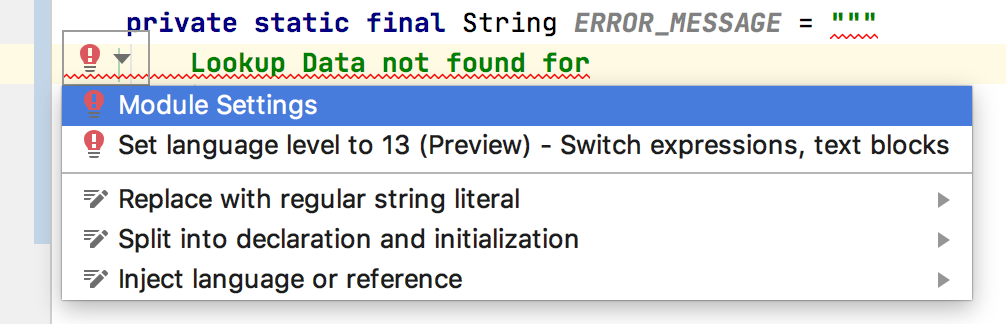
The moment I declared a String and assigned a multiline text literal, IntelliJ got unhappy. A warning bulb popped up and the message was: Text block literals are not supported at language level '13'. I did not understand what the message was saying but the link to Module settings took me to my API module level settings which was like:


It would have been much useful if the message was: Text block literals are not supported at language level '13 (No Preview)' and that current option chosen was: 13 (No Preview) language features. When I pulled down the option list, there I saw the 13 (Preview) option right below it:


That's IntelliJ way of setting the compiler flag --enable-preview to enable preview feature at the module level, if your are coding in a module in a multi-module maven project. Once I switched to the (Preview) one, IntelliJ was happy to compile my code.

NOTE: If you have a multi-module Maven project, you may need to set this Language level at the project level as well as at the each module level.

Maven Build Setup

IDE compiles code as we go on writing code and helps us with missing configurations and fixing errors. But the build system like Maven or Gradle is the one used at the end to clean, compile, package and run the app. Of course, maven build fails without additional setup for enabling preview features. The config setup needs the --enable-preview flag at few places depending on what plugins you have in it's pom.xml file. I had at least four places where I had to use this flag with some additional argument setup as well to get this feature fully enabled for my Spring Boot app.

1. Maven Compiler Plugin

Maven Compiler plugin compiles the project source code. You need to have an additional --enable-preview compiler argument in it's configuration to enable preview features as shown below:

<plugin> <groupId>org.apache.maven.plugins</groupId> <artifactId>maven-compiler-plugin</artifactId> <version>3.8.1</version> <configuration> <release>13</release> <compilerArgs> <arg>--enable-preview</arg> <arg>-Xlint:all</arg> </compilerArgs> </configuration> </plugin>

2. Maven Surefire Plugin

Surefire plugin is used during test phase to run unit tests. You need to have an additional --enable-preview compiler argument in it's configuration to enable preview features. In addition to this you also need to have ${argLine} without which you will not have code coverage reports generated if you are using code coverage libraries like JaCoCo. An example configuration setup is shown below:

<!-- surefire for unit tests --> <plugin> <groupId>org.apache.maven.plugins</groupId> <artifactId>maven-surefire-plugin</artifactId> <version>2.22.2</version> <configuration> <argLine>${argLine} --enable-preview</argLine> </configuration> <dependencies> <dependency> <groupId>org.apache.maven.surefire</groupId> <artifactId>surefire-junit47</artifactId> <version>2.22.2</version> </dependency> </dependencies> </plugin>

3. Maven Failsafe Plugin

Failsafe plugin is used to during test phase to run integration tests. You need to have an additional --enable-preview compiler argument in it's configuration to enable preview features. In addition to this you also need to have ${argLine} without which you will not have code coverage reports generated if you are using code coverage libraries like JaCoCo. An example configuration  setup is shown below:

<!-- failsafe for integration tests --> <plugin> <groupId>org.apache.maven.plugins</groupId> <artifactId>maven-failsafe-plugin</artifactId> <version>2.22.2</version> <executions> <execution> <goals> <goal>integration-test</goal> <goal>verify</goal> </goals> </execution> </executions> <configuration> <argLine>${argLine} --enable-preview</argLine> <additionalClasspathElements> <additionalClasspathElement>${basedir}/target/classes</additionalClasspathElement> </additionalClasspathElements> <includes> <include>**/*IT.java</include> </includes> </configuration> </plugin>

4. Springboot Maven Plugin

Springboot Maven plugin runs your application by launching the embedded Tomcat Server and JVM. You need to tell the JVM launcher to enable preview features by setting the flag as shown below:

<plugin> <groupId>org.springframework.boot</groupId> <artifactId>spring-boot-maven-plugin</artifactId> <version>${spring.boot.version}</version> <executions> <execution> <id>repackage</id> <goals> <goal>repackage</goal> </goals> </execution> <execution> <!-- Useful info on /actuator/info --> <id>build-info</id> <goals> <goal>build-info</goal> </goals> </execution> </executions> <configuration> <mainClass>com.giri.api.Application</mainClass> <jvmArguments>${argLine} --enable-preview</jvmArguments> </configuration> </plugin>


TIP

In IntelliJ IDEA, if you do not have the (Preview) language level set, and if you mouseover the multiline text the warning message shown up like below is bit misleading.


However, when you click on the multi-line literal text, the error shown as below is more meaningful:

References