Showing posts with label groovy. Show all posts

Monday, January 01, 2024

Polyglot makes you a think better and do better - my musing . . .

Fluency in multiple spoken languages (Polyglot) always makes you think better and communicate even better. In Software Development, Polyglot programming makes you a better Software Developer. Being able to code in more than one language makes you think different and write better code.

No language is superior or best for all use-cases. Polyglot experience is very beneficial. It makes you think better when approaching a problem for a solution. In software programming world, it matters more than in the normal world.

Java is undoubtedly the programming language that has been dominant in Software world, longer than any other, and probably will continue to remain dominant for many more years. I worked in Java for a decade before I moved to Groovy. For several years I enjoyed coding in Groovy and did not want to go back to Java. Life doesn't go your way. And now, I am back to Java. I'd rather say, I am back to Java with Groovy eyes and coding experience ;)

Groovy taught me many things in programming, which otherwise, I wouldn't have learnt or changed my object-oriented mindset to think different, if I had just stick myself to Java. I do notice a lot that Java developers who have been coding in just Java for awhile still write Java 1.2 code. Java is evolving faster now for good. But Java developers are not evolving at the same pace with it. Coming back to Java from Groovy, I am not hesitant to use any of the new features that Java is adding version after Java at a fast pace. I did write production Java 13 code with multi-line text blocks which was only a preview feature in Java 13 with --enable-preview flag for compilation and execution. Having experienced even superior multi-line text blocks in Groovy on JVM, I just couldn't write code with several "s,  and +s. Some developer wouldn't even use spaces in between concatenating strings. My eyes get blurry and mind goes blank when I see such code. Polyglot helped me embrace that multi-line text blocks even as an experimental feature in Java 13.

Once in recent years, I had to get my hands dirty with a super-rigid, early twenty-first-century-way written Java family of simple applications with main methods, and tightly coupled code with inheritance, only static member variables in the class hierarchy, no sensible differences between a class and an object, the worst of all- quite a bit of blindly followed manual code changes to be done and checked in after every single run of the code, and a lot of manual copying of both input files before the run and result files after the run. Bringing in a new Java application member to this family of applications require copying one of the applications and start making changes to meet the new application's needs with much of code inherited from the hierarchy.

When I had to add in a new member application to that family of applications, I couldn't follow that family legacy of copy-and-paste tradition. DRY - Don't Repeat Yourself, is the principle that I believe should be taught before even teaching programming. I added a new member to that family following all the messy inheritance as the family was super adamant upfront not to refactor anything. OK, that tells the how bad the code smells. At least I wanted to change the manual procedures and automate them, wanted to change the practice of changing code for every run. Java application's main method takes arguments for this reason. I worked for a financial company (very rigid domain in Software field) in the past and rewrote their bread and butter Oracle stored procedures that computed earnings at the end of each month with its 10,000 lines of code with not event a single line of documentation and the person who wrote it left the company. Nobody was dared to touch the code. People only knew how to calculate earnings, but had no clue how it was implemented in Stored Procedures. I rewrote the whole app in Groovy as a simple runnable Java app with superior command line support with all possible flexibilities to run. The whole app rewritten in Groovy with just few hundred lines of code, made it multi-threaded by bringing down the month end run-time from hours to minutes. That was about a decade ago. If I had to this in Java at that time, it would have made the number of lines of code at least 5 times that Groovy with noise and boilerplate code in dealing with database.

In my current day-to-day development, Groovy is not a choice for production code; only Java. But, we catch up fast using latest versions of Java in production code, few months after a newer version gets  released. That makes me leverage, most recent syntax improvements, language constructs, and feature enhancements and additions being added in every version. In some cases, now, Java code looks little closer to Groovy like code when newer language features are used in support with frameworks.

The very first step I took in adding a new application member to the legacy family was to find good CLI Java framework. I found Picocli, which is super simple to use with no coding, just annotating code. There you go, I used it and brought in a change to the family and paved path for newly joining members to follow the path. This eliminated the need to change code for every run by changing hard-coded constants and check the modified code into version control. By leveraging Picocli, and main method arguments, I externalized few hardcoded values as coming from arguments. That eliminated the need to touch code for every single run. Then automated some more tasks like renaming the generated file manually to meet certain expected naming convention, copying that to another source repo, and checking in that file etc.

Groovy's CliBuilder

In my Groovy development days, I had used Groovy's CliBuilder that comes with Groovy. Only few lines of code makes the application super flexible for driving the inside implementation, processing, or any such logic that depends on values that get passes as arguments to run the application. My Groovy experience helped me a lot to think better, and make the newly added Java application member a very flexible super-kid in the family by leveraging Java's modern features and frameworks like Picocli. 

Java - Picocli

Annotate class and fields, and add either the dependent Picocli class or maven/gradle dependency. With a quick couple of hours of exploration and reading the docs, in few minutes you can add the powerful CLI  feature to your Java Application. It makes it runnable for various scenarios by passing values through different arguments that can drive its functionality in specific ways.

Conclusion

Writing code should be more for developers to read than it is for machines to execute. After all, machine can execute any type of syntactically correct code. There is more than just syntax and semantics in programming, which is READABILITY for humans. Code must first be readable before it is executable.

Change is a constant and there is always scope for improvement, ONLY if you are willing to learn, change, and not afraid to improve ;)

References

Saturday, September 17, 2022

Do more with less - the way to write code, what Groovy taught me . . .

I was not happy at all going back to verbose native Java, leaving my years of happy Groovy and Grails development on JVM. The shrinking market for Groovy pushed me out, but I am not away from it. I still stay with it and write Groovy code on any given day. At least on the side, when I explore and experience some of new Java language features along the way. One question always comes to my mind is - how did we do it in Groovy, why didn't we have to worry about this obvious expectations. The comparison always pleasantly proves that Groovy stood by it's literal word-meaning- very pleasant, to work with, and a very well thought-out and super consistent language on JVM right from day-1.

Environment: Java 17, Groovy 4.0.2 on macOS Catalina 10.15.7

In my recent Java code, I was dealing with a list of request objects that come in a specific order, and had to give the response objects back in the same order after doing some internal processing that included database query for the list by ids with Spring Data's findAllBy conventional interface. In between I built a map from the request list for faster lookup of specific object's request details. I wanted to retain the order in the map and then the Java's functional feature threw me out to know some internals and come back before take things granted for to use it.

The following is a simple code snippet comparing both Java and Groovy features in the same Groovy script. That's another beauty of Groovy, you can write both Java and Groovy code in one class file.

import java.util.stream.Collectors // a data item record Item(Integer id, String name){} //groovy List items = [ new Item(1, 'One'), new Item(2, 'Two'), new Item(3, 'Three'), new Item(4, 'Four'), new Item(5, 'Five'), new Item(6, 'Six'), new Item(7, 'Seven'), new Item(8, 'Eight'), new Item(9, 'Nine'), new Item(10, 'Ten'), ] println "Groovy\n======" println "Items[id:Integer, name:String]: ${items}" def itemsMap = items.collectEntries{[it.name(), it.id()]} println "Items map by name (order preserved): ${itemsMap}" println "Items map keys (order preserved): ${itemsMap.keySet()}" // java List itemsJava = List.of( new Item(1, "One"), new Item(2, "Two"), new Item(3, "Three"), new Item(4, "Four"), new Item(5, "Five"), new Item(6, "Six"), new Item(7, "Seven"), new Item(8, "Eight"), new Item(9, "Nine"), new Item(10, "Ten") ); System.out.println("Java\n===="); System.out.println("Items[id:Integer, name:String]:" + itemsJava); var itemsMapJava = itemsJava.stream() .collect( Collectors.toMap( item -> item.name, item -> item.id ) ); System.out.println("Items map by name (order NOT preserved): " + itemsMapJava); System.out.println("Items map keys (order NOT preserved): " + itemsMapJava.keySet().stream().toList()); var itemsMapOrderPreserved = itemsJava.stream() .collect( Collectors.toMap( item -> item.name, item -> item.id, (key1, key2) -> key1, // key conflict resolver LinkedHashMap::new // pass the underlying map implementation you want, to preserve the order, defaults to HashMap ) ); System.out.println("Items map by name (order preserved): " + itemsMapOrderPreserved); System.out.println("Items map keys (order preserved): " + itemsMapOrderPreserved.keySet().stream().toList());

The output:

Groovy ====== Items[id:Integer, name:String]: [Item[id=1, name=One], Item[id=2, name=Two], Item[id=3, name=Three], Item[id=4, name=Four], Item[id=5, name=Five], Item[id=6, name=Six], Item[id=7, name=Seven], Item[id=8, name=Eight], Item[id=9, name=Nine], Item[id=10, name=Ten]] Items map by name (order preserved): [One:1, Two:2, Three:3, Four:4, Five:5, Six:6, Seven:7, Eight:8, Nine:9, Ten:10] Items map keys (order preserved): [One, Two, Three, Four, Five, Six, Seven, Eight, Nine, Ten] Java ==== Items[id:Integer, name:String]:[Item[id=1, name=One], Item[id=2, name=Two], Item[id=3, name=Three], Item[id=4, name=Four], Item[id=5, name=Five], Item[id=6, name=Six], Item[id=7, name=Seven], Item[id=8, name=Eight], Item[id=9, name=Nine], Item[id=10, name=Ten]] Items map by name (order NOT preserved): [Eight:8, Five:5, Six:6, One:1, Four:4, Nine:9, Seven:7, Ten:10, Two:2, Three:3] Items map keys (order NOT preserved): [Eight, Five, Six, One, Four, Nine, Seven, Ten, Two, Three] Items map by name (order preserved): [One:1, Two:2, Three:3, Four:4, Five:5, Six:6, Seven:7, Eight:8, Nine:9, Ten:10] Items map keys (order preserved): [One, Two, Three, Four, Five, Six, Seven, Eight, Nine, Ten]

Conclusion

Java started to evolve, changing faster than it used to be and faster than the community can catch up- all for good. It's slowly getting to be less verbose. Still, certain obvious expectations are not so obvious in Java.

Groovy shined next to legacy Java, still shines next to modern Java, on the JVM.

Wednesday, October 06, 2021

I still love Groovy . . .

I was joyfully coding in Groovy for several years. Back to Java two years ago, and have not been writing any production code in Groovy, still writing my own productive non-production utilities in Groovy whenever and wherever I can.

I am trying my best to apply neat things that I learned while working in Groovy projects by using its ecosystem frameworks like Grails framework, Gradle build tool,  Spock framework etc. Within the limitations of Java, Spring Boot, and Maven development world, I am trying hard to write less verbose, and more readable code by leveraging new Java language features including some of each of its version's preview features.

Java is evolving at a steady pace now. Better late than never ;). Still far-away compared to what Groovy was 10+ years ago, or any of current modern languages, in terms of developer's productivity.

I was bit happy to see some convenient factory methods making into Java's collection classes, version after version, since Java 9. Have been happily using one such static factory method .of() on List and Map without caring much of their internal implementations. 

Environment: Java 16, Groovy 3.0.9 on macOS Catalina 10.15.7

Today, I was happily writing code using Map.of() method and kept on adding elements, I had about a dozen of static keys and values to add. IntelliJ was also going happy with me. At some point suddenly IntelliJ turned angry (red) at me. The error was not clear, another Java classic hard-to-understand compilation error. I started to wonder what did I do wrong, was going back and forth on each element I was adding. Quickly realized I was hitting some limitation. Java language team chose the lucky number 10 for these convenient factory methods. There are actually 10 static factory methods named of() that take one to ten arguments.

I fell in love with it, the very first-time I started using it as it's little more concise and readable (not as concise and readable as groovy, but close), but quickly ran into limitations.
  • Map.of() method introduced in Java 9 allows to create an immutable map with up to 10 keys-value pairs.
  • It return an immutable map.
So, use it when you are ok with immutable small Map of up to 10 elements.

The following groovy snippet shows how close (still little more verbose) Java got to Groovy from the painful-finger-typing way to create and initialize a Map with a fixed set of elements. 

// Groovy def groovyMap = [ 'a' : [1], 'b' : [1,2], 'c' : [1,2,3], 'd' : [1,2,3,4], 'e' : [1,2,3,4,5], 'f' : [1,2,3,4,5,6], 'g' : [1,2,3,4,5,6,7], 'h' : [1,2,3,4,5,6,7,8], 'i' : [1,2,3,4,5,6,7,8,9], 'j' : [1,2,3,4,5,6,7,8,9,10], 'k' : [1,2,3,4,5,6,7,8,9,10,11], 'l' : [1,2,3,4,5,6,7,8,9,10,11,12], ] println groovyMap // Java var javaMap = Map.of( "a" , List.of(1), "b" , List.of(1,2), "c" , List.of(1,2,3), "d" , List.of(1,2,3,4), "e" , List.of(1,2,3,4,5), "f" , List.of(1,2,3,4,5,6), "g" , List.of(1,2,3,4,5,6,7), "h" , List.of(1,2,3,4,5,6,7,8), "i" , List.of(1,2,3,4,5,6,7,8,9), "j" , List.of(1,2,3,4,5,6,7,8,9,10), "k" , List.of(1,2,3,4,5,6,7,8,9,10,11), "l" , List.of(1,2,3,4,5,6,7,8,9,10,11,12) ) println javaMap

IntelliJ goes unhappy, with error:
Cannot resolve method 'of(java.lang.String, java.util.List<E>, java.lang.String, java.util.List<E>, java.lang.String, java.util.List<E>, java.lang.String, java.util.List<E>, java.lang.String, java.util.List<E>, java.lang.String, java.util.List<E>, java.lang.String, java.util.List<E>, java.lang.String, java.util.List<E>, java.lang.String, java.util.List<E>, java.lang.String, java.util.List<E>, java.lang.String, java.util.List<E>, java.lang.String, java.util.List<E>

Java compiler stays unhappy with compilation error:

no suitable method found for of(java.lang.String,java.util.List<java.lang.Integer>,java.lang.String,java.util.List<java.lang.Integer>,java.lang.String,java.util.List<java.lang.Integer>,java.lang.String,java.util.List<java.lang.Integer>,java.lang.String,java.util.List<java.lang.Integer>,java.lang.String,java.util.List<java.lang.Integer>,java.lang.String,java.util.List<java.lang.Integer>,java.lang.String,java.util.List<java.lang.Integer>,java.lang.String,java.util.List<java.lang.Integer>,java.lang.String,java.util.List<java.lang.Integer>,java.lang.String,java.util.List<java.lang.Integer>,java.lang.String,java.util.List<java.lang.Integer>) method java.util.Map.<K,V>of() is not applicable (cannot infer type-variable(s) K,V (actual and formal argument lists differ in length)) method java.util.Map.<K,V>of(K,V) is not applicable (cannot infer type-variable(s) K,V (actual and formal argument lists differ in length)) method java.util.Map.<K,V>of(K,V,K,V) is not applicable (cannot infer type-variable(s) K,V (actual and formal argument lists differ in length)) method java.util.Map.<K,V>of(K,V,K,V,K,V) is not applicable (cannot infer type-variable(s) K,V (actual and formal argument lists differ in length)) method java.util.Map.<K,V>of(K,V,K,V,K,V,K,V) is not applicable (cannot infer type-variable(s) K,V (actual and formal argument lists differ in length)) method java.util.Map.<K,V>of(K,V,K,V,K,V,K,V,K,V) is not applicable (cannot infer type-variable(s) K,V (actual and formal argument lists differ in length)) method java.util.Map.<K,V>of(K,V,K,V,K,V,K,V,K,V,K,V) is not applicable (cannot infer type-variable(s) K,V (actual and formal argument lists differ in length)) method java.util.Map.<K,V>of(K,V,K,V,K,V,K,V,K,V,K,V,K,V) is not applicable (cannot infer type-variable(s) K,V (actual and formal argument lists differ in length)) method java.util.Map.<K,V>of(K,V,K,V,K,V,K,V,K,V,K,V,K,V,K,V) is not applicable (cannot infer type-variable(s) K,V (actual and formal argument lists differ in length)) method java.util.Map.<K,V>of(K,V,K,V,K,V,K,V,K,V,K,V,K,V,K,V,K,V) is not applicable (cannot infer type-variable(s) K,V (actual and formal argument lists differ in length)) method java.util.Map.<K,V>of(K,V,K,V,K,V,K,V,K,V,K,V,K,V,K,V,K,V,K,V) is not applicable (cannot infer type-variable(s) K,V (actual and formal argument lists differ in length))

When I executed the above code snippet in groovyconsole Groovy compiler at least gave me little better message pointing at the line (29: "k" , List.of(1,2,3,4,5,6,7,8,9,10,11),) that failed compilation and made me think of exceeding some limitation.

groovy.lang.MissingMethodException: No signature of method: static java.util.Map.of() is applicable for argument types: (String, List12, String, List12, String, ListN, String, ListN, String...) values: [a, [1], b, [1, 2], c, [1, 2, 3], d, [1, 2, 3, 4], e, [1, 2, ...], ...] at ConsoleScript9.run(ConsoleScript9:29)

The workaround, I had to go more verbose; at least, better than old way of painful-finger-typing. ;)
import static java.util.Map.entry; // Groovy def groovyMap = [ 'a' : [1], 'b' : [1,2], 'c' : [1,2,3], 'd' : [1,2,3,4], 'e' : [1,2,3,4,5], 'f' : [1,2,3,4,5,6], 'g' : [1,2,3,4,5,6,7], 'h' : [1,2,3,4,5,6,7,8], 'i' : [1,2,3,4,5,6,7,8,9], 'j' : [1,2,3,4,5,6,7,8,9,10], 'k' : [1,2,3,4,5,6,7,8,9,10,11], 'l' : [1,2,3,4,5,6,7,8,9,10,11,12], ] println groovyMap // Java var javaMap = Map.ofEntries( entry("a" , List.of(1)), entry("b" , List.of(1,2)), entry("c" , List.of(1,2,3)), entry("d" , List.of(1,2,3,4)), entry("e" , List.of(1,2,3,4,5)), entry("f" , List.of(1,2,3,4,5,6)), entry("g" , List.of(1,2,3,4,5,6,7)), entry("h" , List.of(1,2,3,4,5,6,7,8)), entry("i" , List.of(1,2,3,4,5,6,7,8,9)), entry("j" , List.of(1,2,3,4,5,6,7,8,9,10)), entry("k" , List.of(1,2,3,4,5,6,7,8,9,10,11)), entry("l" , List.of(1,2,3,4,5,6,7,8,9,10,11,12)) ) println javaMap

NOTE: It's only the Map.of() that has this limitation, the methods List.of(), Set.of() do not have.

Gotcha

  • The method map.of() returns an immutable map though the method signature says it returns simply a Map.
  • In other words it is an unmodifiable map, keys and values cannot be added, removed or updated.
  • When operation to modify the returned Map like put(), replace(), or remove() are performed, they would result with an UnsupportedOperationException with a null exception exception message ;)

Conclusion

I still love Groovy for its simple, less confusing, yet more expressive syntax.

References


Friday, March 06, 2020

Fly safe within limits with Flyway in a Spring Boot application . . .

Flyway seems more popular than Liquibase in Java world. Coming back to Java after few years of joy with Grails and it's much more flexible db migration solution offered by grails database-migration plugin which has Liquibase under covers, I certainly felt little limited flying in with Java-Flyway in the very first couple of hours of exploring it.

Liquibase offers more flexibility through a ledger, a change-log XML file in which you define the order of your migration scrips. Grails database-migration plugin enhances migration scripts typically written in SQL with added DSL Groovy support. Also, the change-log file can be in groovy instead of XML. XML was once hot and is a legacy now (except for Maven, it's still modern). Grails database-migration plugin offers full power of dealing with database migrations including full support for generating base-level or starting migration script, incremental change scripts, a rollback mechanism etc. The documentation is also top notch.

With Flyway, you do not have that flexibility dealing with the order or migration scripts through change-log like ledger file. You have to follow version-embedded filename (SQL or Java) conventions. It is highly recommended to follow timestamp based filename versioning. I am yet to explore it's Java way of dealing with complex migrations, but I am sure it is not going to be as pleasing as working with database migrations in Grails projects with expressive nature of Groovy code.

There are tons of articles comparing both Flyway and Liquibase. This post is not to compare, but some exploration of Flyway and JPA capabilities with Grails database-plugin mindset in a Java-based Spring Boot project with JPA.

Environment: Java 13, Spring Boot 2.2.4.RELEASE, PostgreSQL 12.1, Maven 3.6.2 on macOS High Sierra 10.13.6

Generate BASE DDL

It is tempting to start hand-coding Flyway SQL scripts once you make your initial domain model ready with JPA annotations. This is highly error prone and disconnects your domain model powered with JPA from DB in the process of initializing DB with schema and getting it validated against the model. One way to achieve this is to generate DDL scripts from the model.

I prefer to have DDL scripts generated than hand-coding. JPA has this feature and Hibernate offers a decent implementation. This will give you a jumpstart with db migration scripts. You can take generated script by the well-known tool: copy and paste into Flyway migration script file and polish it further. This way, your model gets verified through the generated script taken into Flyway script and applied to DB. Thus any discrepancies between the model and DB can be avoided later in the game.

In order to get the DDL script generated, you need to make some run-time configuration changes for your local environment (the environment for which you need to get DDL generated). There are three ways to do this (at least the possible ways I've explored).

Option-1: Make changes to your environment properties/yml file as shown below:

bootstrap-local.yml
spring: jpa: properties: hibernate: # generating DDL - add me, Hibernate 5.1.0 onwards the default end of SQL statement delimiter is none in generated DDLs hbm2ddl.delimiter: ';' # generating DDL - add me javax: persistence: schema-generation: scripts: action: create create-target: create.sql flyway: # generating DDL, make sure I am turned off enabled: false

Run your app with the above changes, and you will have create.sql file generated in the directory where you run your app from. Examine and make any necessary changes to the DDL generated before copying that into Flyway Base SQL script.

Revert the changes done to your environment properties/yml file and bring up the application. Flyway should be flying happily taking the base DDL script file and applying it to your database.

Option-2: Set those properties on the maven command line (*fine-print: Due to some reason, this option doesn't work consistently for me, I am not at all happy with Spring Boot Maven Plugin's documentation. You need to depend on extensive and tireless search to find out how to get this done :( )

Alternatively, you can simply override those run-time config properties for your local env in the maven command and get the DDL generated. This way you don't have to temporarily change your local run-time config file every time when you need to generate DDL and revert it afterwards. An example of running maven wrapper command on the root project when you have a spring-boot project (my-service-api) as one of modules, is shown below:

./mvnw -pl myservice-api clean install spring-boot:run -Dspring-boot.run.profiles=local -DskipTests \ -Dspring-boot.run.arguments=\ --spring.flyway.enabled=false,\ --spring.jpa.properties.javax.persistence.schema-generation.scripts.action=create,\ --spring.jpa.properties.javax.persistence.schema-generation.scripts.create-target=create.sql,\ --spring.jpa.properties.hibernate.hbm2ddl.delimiter=\;

In the above command, we basically have overridden four run-time config properties earlier shown in yml file for DDL generation:
  1) disabled Flyway
  2) specified schema-generation type
  3) specified the DDL file name to be generated
  4) specified the delimiter character, the end of statement character for SQL statements generated in the DDL file.

All backslashes (\) are just shell line-breakers except the very last one to escape the end of statement delimiter character (;) in the generated DDL script.

If you are lucky, you will have create.sql file generated in the directory you ran this command from. Examine the DDL generated before copying it into Flyway Base SQL script.

Simply bring up your application. Flyway should be flying happily taking the base DDL script file and applying it to your database.

Option-3 (My preferred option): Run with your runnable jar

Have a runnable jar created (typically under target directory in your module). Simply bring up the application by passing all those properties to override on the command line. This way, you can stay away from Maven and from all issues it brings in along with it. An example is shown below:

For action create:
java --enable-preview -Dspring.profiles.active=local -jar <path/to/your/jar-file/executable/jar-file.jar> \ --spring.flyway.enabled=false \ --spring.jpa.properties.javax.persistence.schema-generation.scripts.action=create \ --spring.jpa.properties.javax.persistence.schema-generation.scripts.create-target=create.sql \ --spring.jpa.properties.hibernate.hbm2ddl.delimiter=\;

For action update:
java --enable-preview -Dspring.profiles.active=local -jar <path/to/your/jar-file/executable/jar-file.jar> \ --spring.flyway.enabled=false \ --spring.jpa.properties.javax.persistence.schema-generation.scripts.action=update \ --spring.jpa.properties.javax.persistence.schema-generation.scripts.create-target=update.sql \ --spring.jpa.properties.hibernate.hbm2ddl.delimiter=\;


Again, all backslashes (\) are just shell line-breakers except the very last one to escape the end of statement delimiter character (;) in the generated DDL script.

If you want to run it from IntelliJ instead of command-line, setup a Run Configuration as shown below:


Incremental DDL changes

Once you have base DDL Flyway script applied, as you progress with your development, there will be changes made to domain model as it starts to evolve. As and when your domain model goes through changes, you need to put corresponding Flyway SQL migration scripts in place.

I'VE NOT FOUND A WAY TO GET THIS DONE!

NOTE: Though I have not found an action like update authoritatively documented anywhere, I just tried and it does work and generating something but not very useful. All I tried was changing action to update from create and create-target to update.sql from create.sql.

If you have your previously generated create.sql/update.sql file hanging around and use the same for incremental changes, it simply gets appended with the resulted incremental DDL statements. That is definitely not what you want. So, make sure that you delete or use a different name.

Once, you have the incremental DDL script, examine it, and copy it to new Flyway script file. Bring up the app to have Flyway flying again taking the newly added script with it and applying it to the Database.

Leverage JPA Annotations as much as you can in order to generate your DDL accurately

A good Database schema design should have all data constraints applied. These constraints include primary key constraints, foreign key constraints, unique constrains etc. JPA offers annotations that can be leveraged in generating constraint creation DDL commands as well.

PRIMARY KEY Constraint
public class MyDomain { @Id @GeneratedValue(strategy = GenerationType.IDENTITY) @Column(nullable = false, updatable = false) private Long id; ... }

The above JPA annotation generates the following DDL script:

CREATE TABLE my_domain {
id SERIAL PRIMARY KEY, ... }

When the type is SERIAL PostgreSQL generates a table specific sequence my_domain_seq and with IDENTITY generation strategy, this sequence is used both by database and JPA.

UNIQUE KEY Constraint
@Table( uniqueConstraints = @UniqueConstraint( columnNames = {"prop1", "prop2"} name = "my_domain_p1_p2_uk" ) ) public class MyDomain { ... String prop1; String prop2; }

The above JPA annotation generates the following DDL script:
ALTER TABLE my_domain ADD CONSTRAINT my_domain_p1_p2_uk UNIQUE (prop1, prop2);

FOREIGN KEY Constraint
public class MyDomain { ... @ManyToOne(fetch = FetchType.EAGER, optional = false) @JoinColumn( name = "my_prop_type_id" foreignKey = @ForeignKey(name = "my_domain_mpt_fk"), nullable = false, insertable = flase, updatable = false ) private MyPropType myPropType; ... }

The above JPA annotation generates the following DDL script:
ALTER TABLE my_domain ADD CONSTRAINT my_domain_mpt_fk FOREIGN KEY (my_prop_type_id) REFERENCES my_prop_type;

TIPS

Get that missing Semicolon back

Without explicitly setting the property spring.jpa.properties.hibernate.hbm2ddl.delimiter=; the generated DDL statements will not end with semi-colon. If you set it on the command line instead of the env specific application yml/properties file, make sure to escape ; with \ as shown below:
spring.jpa.properties.hibernate.hbm2ddl.delimiter=\;

Turn Flyway on/off

Flyway can be turned on/off by setting the property spring.flyway.enabled=true/false. It can either be set in application yml/properties files or on the command line when mvn/mvnw is run. I am not happy with overriding on the maven command line is as it takes up my time with stupid errors that I do not want to break my head with anymore, use this option at your own discretion :)

Happy Coding!
Have a limited but safe flight with Flyway and Maven in a Spring Boot application!!

Saturday, February 15, 2020

Bank on Lombok in a Spring Boot application . . .

It's been over a decade since my eyes had seen Java boiler plate code like getters, setters, various overloaded constructors,  toString(), equals(), hashCode() methods etc. My brain and eyes got used to very quiet and clean code. Now, I suddenly realize the fact that I have been quietly (joyfully) coding in Groovy for a long time. I am back to Java and all that noise is back and started to bother both my brain and eyes :(

To push all that noise away from your eye-sight into compiled Java byte-code, there is this nice Java library called: Lombok. Java developers never say NO to another jar file dependency as Java world simply loves to have tonnes and tonnes of libraries in projects, anyway ;)

Lombok is a neat Java library, both developer and compiler friendly, saves a lot of time, makes code look less noisy, and increases the life of both keyboard and your fingers ;). It provides various useful annotations to generate all that boiler plate code into compiled byte-code to please Java compiler and many Java frameworks. There are many resources and blog-posts on Lombok. I am only describing few annotations that I have explored in the context of Spring Boot with JPA and thought would be useful across many Java projects. I will definitely take Lombok with me into every Java project that I get into.

Environment: Java 13.01, Spring Boot 2.2.4.RELEASE, Maven 3.6.2, IntelliJ IDEA ULTIMATE 2019.3 on macOS High Sierra 10.13.6

All you need to start leveraging Lombok in any Java project is just a dependency in your build configuration(maven/grade). That takes care of giving you the power to auto-generate all that noise and push it away into byte-code by annotating your code, when your code gets compiled as part of the build process. But, IDEs compile code as we write and may need a bit more setup in order for the compiled classes to have all boiler plate code generated into the bytecode.

IntelliJ IDEA Support and Setup

IntelliJ IDEA requires the following 2 steps:
  1. Install Lombok plugin.
      Press Cmd + , (⌘,) or go to IntelliJ IDEA > Preferences
      Click Plugins, Search for Lombok and install
  2. Enable Java compiler feature: Annotation Processors.
      Press Cmd + , (⌘,) or go to IntelliJ IDEA > Preferences
      Go to Build, Execution, Deployment > Compiler > Annotation Processors and Check Enable Annotation Processing


Eclipse based IDE Setup

Check this article: Setting up Lombok with Eclipse and IntelliJ

Some Useful Lombok Annotations


This annotation takes a Java POJO (Plain Old Java Object) nearer to Groovy POGO (Plain Old Groovy Object) by taking away lot of boiler plate methods. Typically, domain objects do not contain any logic other than fields/properties to carry data for persistence. JPA Entities or any kind of objects that carry data are good candidates to leverage this annotation. Annotate a class with this and forget all getters, setters, toString(), hashCode(), equals() etc.


Annotating a class with this, you don't have to worry about providing a constructor to initialize required object properties to initialize the object with. Very useful in Spring beans/components like Services where in you typically write an all args constructor that takes all dependency beans and set the required dependencies. This is preferred over using @Autowired for dependencies for various good reasons. In this case, if you add a new dependency to an existing service, you don't have to worry changing/missing-to-change the constructor.

Also, in Enums if you have extra properties set for each enum instance, you can skip writing and maintaining a constructor which is required by annotating an enum with this.


Usually no args constructor, also called default constructor comes free and provided by Java compiler. By writing specific constructors, this freebie is taken away. On those instances, you still may need to provide this constructor for frameworks that need it. This annotation is useful in such cases.

@RequiredArgsConstructor

Useful in a SpringBoot application when you use constructor based injection than field based  injection (@Autowired). Constructor based injection is preferable than field based injection anyway for various good reasons. In this case, you typically declare all required dependent beans as static final fields by providing a constructor that initializes all of those required beans. SpringBoot auto injects all those beans by calling the constructor.

This annotation is right for this kind of situation with which you don't need to write the constructor and maintain it as you add more dependency beans. Also, with this the moment you add another static final required bean dependency, somewhere in your unit tests where you had used this provided constructor to initialize dependencies fails to compile right away.


These flexible annotations for fields/properties of a class reduce Java bean noisy methods required by many Java frameworks like Hibernate. This itself is good relief for eyes!

@Builder

This annotation brings in builder pattern implemented into the bytecode. Oftentimes, simple POJOs contain many properties. Creating and object becomes bit complex by traditional POJO way of create an object and populate properties by calling setters one by one which may lead to missing setting some properties. A builder pattern brings in fluent object creation by using a builder method followed by setters and the end calling a method to build.


If you use builder pattern/support provided to facilitate readable complex object instantiation and have an object hierarchy, you need to annotate your super class(es) with this annotation for all the properties inherited from the super class to be available to build setter methods. Though it is still listed as an experimental feature, it is very useful and safe to use.


It is typical in Java code you may write or come across utility classes with just static methods. Code coverage tools like JaCoCo report the class definition line (e.g. public class MyUtilityClass {) as uncovered for these classes as there won't be an instance created. You can fool the tool by just creating an instance of it, but that's stupid to do to get coverage. Even if you make the class final and provide a private constructor to fully protect it from creating an instance (a typical utility class should be like this anyway), this additional noise will not get any coverage as there won't be any test for private constructor to get coverage. Also, there is NO reason to break your head to get coverage for private constructor.

So, the best way is to take away all that noise from code into byte-code and exempt it from coverage. The annotation @UtilityClass gives you exactly this by making the class final and providing a private constructor in the byte-code. It not only takes away the noisy boilerplate code away but also improves the coverage as you tell JaCoCo anyways to ignore Lombok generated methods in byte-code. Neat!

Code coverage is only a measure to see how much of code is covered in automated tests. But little things like these add up and bring down the total percentage way down in some cases. It's a time saver if all such nasty noise goes away into byte-code without even bothering about code coverage.

e.g.
/** * This class is lean and clean. The annotation takes away boiler-plate code like final with private constructor into bytecode. * Also, all public methods are static. * Once you write tests for all methods and conditions, you are guaranteed to get 100% coverage. */ @UtilityClass public class MyUtil { public final String MY_CONSTANT = "Just a constant!"; public void m1() { ... } public void m2() { ... } }


Java's NullPointerException is a billion dollar mistake. Though Java is strongly typed language, the weakness lies in the null type and compiler doesn't provide any mechanism to safeguard that null reference. Kotlin addresses this issue by distinguishing types further into nullable types and non- nullable types and enforcing checks during compilation time. This is one of Kotlin's selling and compelling features to Java developers.

Checking each argument of each method for null is so much of noise in code. Java 7's added Objects.requireNonNull() method may only lessen the noise by eliminating the need for if(arg != null){...} else {...} kind of checks with one statement per argument, but still is smelly and noisy.

Java SE 8 added another convenient class java.util.Optional<T> around this problem to deal with in code, which helps design better APIs by indicating that the users whether to expect a null and forcing them to unwrap Optional object to check for the value. Also, it provides some convenient methods to make code more readable. However, it is not a solution to replace every null reference in your codebase.

Lombok's annotation @NonNul comes to rescue. Every method argument that cannot be null can simply be annotated with this which eliminates all the noise and makes code lot more readable. The intent goes into method definition. Under the covers, it just wraps the method body with a similar if null else check that we write otherwise. All that is invisible and is only visible in bytecode. Using this annotation doesn't take away the response to write tests for these null conditional checks if you have code coverage tools like JaCoCo used which still sees all such if conditional check in the bytecode anyway. It doesn't make sense to add more boiler plate code in unit tests by writing test cases just to test those if null check generated into byte-code. Fortunately, there is a Lombok setting that can tell JaCoCo to ignore these wrapped if null checks in byte-code.

lombok.nonNull.exceptionType=JDK

@Generated

Though there is no mention of this in the list of annotations in Lombok's stable or experimental features, it's good to know that there is one like this not for developer's to use in the code, but is for tools to indicate tell not to bother checking for coverage. The api doc has enough details on this.

@Slf4j

Last but not least, Lombok comes with variations of logging annotation for all widely used logging implementations in Java.

Logging is absolutely a needed feature in any application. In Java world, this feature becomes noisy as your number of classes start to grow more than one. Every class/object that needs to log must order a logger object from the factory. The factory needs to know the class for which the logger is needed. This class you give to the factory is typically the class itself that is making an order to the factory. In doing so, every class that needs to log must have a static final logger field initialized with the classname passing to the log factory.

All that factory business was very exciting in the beginning of this millennium. After two decades, there is no reason to have all this routine noise from the log factories to be visible in the code. In my opinion, this one annotation alone is good enough for adding Lombok to a Java application. Annotate classes with this and move that business with factories into bytecode.

Tips


When a class is annotated with Builder annotation, make sure that in some cases for frameworks like Jackson used for JSON serialization that require no-are constructor. The @Builder Design Pattern takes away the default no-arg constructor and forces one to use builder method to create an object. This will make frameworks that leverage no-arg constructor fail.

In this case, your better option would be to add @NoArgsConstuctor and @AllArgsConstructor in addition to @Builder. Both constructor annotation are needed.

@Data, @Getter, @Setter - override specific getter(s) or setter(s)

When a class is annotated with @Data, or @Getter and @Setter, getter and setter methods are generated. If due to any reason if a custom/overriding getter or custom setter is needed for any property, simple provide one the way you would like to, following Java bean style. Lombok won't generate for those ones you have provided.

JaCoCo - code coverage

If you have Java Code Coverage tools like JaCoCo configured for your project and a high coverage threshold level is set, you will get disappointed with the coverage metrics showing the levels suddenly dropping down due to Lombok. This is all due to JaCoCo working at the bytecode level considering all methods including constructors, getter, setters, hashCode etc. that got generated by Lombok. This boiler plate code that got synthesized by Lombok during compilation time doesn't need code coverage. In order to tell JaCoCo not to consider Lombok generated code in the bytecode, create a file with name lombok.config at the root of your project and have the following properties. Your coverage numbers will come back to normal.

# Jacoco >= 0.8.0 and lombok >= 1.16.14 feature # This property adds annotation lombok.@Generated to relevant classes, methods and fields. Jacoco code-coverage # identifies, detects and ignores all Lombok generated boilerplate code getter, setters, hashCode, builder etc. lombok.addLombokGeneratedAnnotation = true # Set lombok to throw Just JDK NullPointerException (default anyway) in the wrapped code. # Also, let JaCoCo honor and not complain coverage for if(!null){} method wrapper generated in the byte-code lombok.nonNull.exceptionType=JDK # Stop Lombok from serching for config files further config.stopBubbling = true

Summary

Lombok is a pretty neat Java library which not only takes noise away from code into bytecode, but also makes code more readable by showing the intention clearly with annotated code. The minimalist phrase "Less is more" becomes a reality with Lombok's addition to a Java project.

Source Code is for Java developers, whereas bytecode is for Java virtual machine. Noise is noise for humans, but not for machines. Java is evolving and changing fast, but still is very noisy and verbose. Any little effort made to make code less noisy and more readable goes a long way in the life of any Java project by saving lot of developers time who read the code later. After all code is written once, but read many times by many in the life of a project.

"Lean and clean" is always beautiful, makes everyone smile and feel better ;)

Make friendship with Lombok, stay healthy, keep your eye-sight better, and your brain calmer!!

References


Saturday, February 08, 2020

Review of Java 13 "Preview Features" in Spring Boot app with Maven . . .

Writing code in Groovy for few years and now back to Java, I couldn't resist using one of the preview features added to Java 13 - Text Blocks. Multiline String literal is the most ugliest part of Java code polluted with escape characters and concatenation operator all over, to an extent that your brain cannot read the string actually. Writing a multiline XML/JSON string is a nightmare. There is no reason to live with such constraints in a language for this long. At last, Java 13 added support for multiline string as a preview feature. It's not going to go away but might go through some changes in future releases and is a pleasant to start using, infact. This blog post is not about text blocks, but several things that you need to do correctly in order to fully leverage preview features in a SpringBoot application with Maven as the build tool.

I was working on a Spring Boot micro-service app with Java 13 from ground up. I had to define a long String literal for a message. After enjoying Groovy's fantastic and superior support for defining multi-line text as a String for long enough, my eyes would certainly go blind if I do not leverage Java 13 Text Blocks in Java code for this. Thought it appears to be simple to just enable Java language preview feature with --enable-preview flag, in reality it goes beyond that simplicity. Not a surprise, after all technology only gets complex ;)

Environment: Java 13.01, Spring Boot 2.2.4.RELEASE, Maven 3.6.2, IntelliJ IDEA ULTIMATE 2019.3 on macOS High Sierra 10.13.6

Java 13 --enable-preview language flag

This is the flag you need to set for enabling Java 13 preview features, both for compiler (javac) and JVM launcher (java). Without this flag your code will not get compiled or run. With this flag you will still see a warning but can ignore safely. In order to use Java 13 features in a SpringBoot app with Maven, you need one or many or all of the following.

IntelliJ IDEA Setup

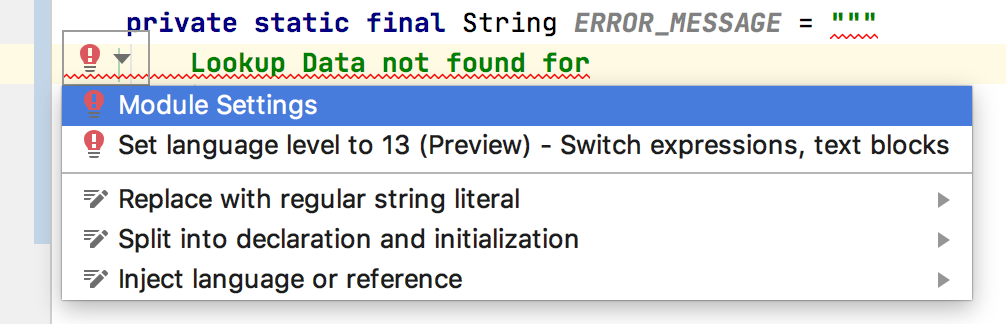
The moment I declared a String and assigned a multiline text literal, IntelliJ got unhappy. A warning bulb popped up and the message was: Text block literals are not supported at language level '13'. I did not understand what the message was saying but the link to Module settings took me to my API module level settings which was like:


It would have been much useful if the message was: Text block literals are not supported at language level '13 (No Preview)' and that current option chosen was: 13 (No Preview) language features. When I pulled down the option list, there I saw the 13 (Preview) option right below it:


That's IntelliJ way of setting the compiler flag --enable-preview to enable preview feature at the module level, if your are coding in a module in a multi-module maven project. Once I switched to the (Preview) one, IntelliJ was happy to compile my code.

NOTE: If you have a multi-module Maven project, you may need to set this Language level at the project level as well as at the each module level.

Maven Build Setup

IDE compiles code as we go on writing code and helps us with missing configurations and fixing errors. But the build system like Maven or Gradle is the one used at the end to clean, compile, package and run the app. Of course, maven build fails without additional setup for enabling preview features. The config setup needs the --enable-preview flag at few places depending on what plugins you have in it's pom.xml file. I had at least four places where I had to use this flag with some additional argument setup as well to get this feature fully enabled for my Spring Boot app.

1. Maven Compiler Plugin

Maven Compiler plugin compiles the project source code. You need to have an additional --enable-preview compiler argument in it's configuration to enable preview features as shown below:

<plugin> <groupId>org.apache.maven.plugins</groupId> <artifactId>maven-compiler-plugin</artifactId> <version>3.8.1</version> <configuration> <release>13</release> <compilerArgs> <arg>--enable-preview</arg> <arg>-Xlint:all</arg> </compilerArgs> </configuration> </plugin>

2. Maven Surefire Plugin

Surefire plugin is used during test phase to run unit tests. You need to have an additional --enable-preview compiler argument in it's configuration to enable preview features. In addition to this you also need to have ${argLine} without which you will not have code coverage reports generated if you are using code coverage libraries like JaCoCo. An example configuration setup is shown below:

<!-- surefire for unit tests --> <plugin> <groupId>org.apache.maven.plugins</groupId> <artifactId>maven-surefire-plugin</artifactId> <version>2.22.2</version> <configuration> <argLine>${argLine} --enable-preview</argLine> </configuration> <dependencies> <dependency> <groupId>org.apache.maven.surefire</groupId> <artifactId>surefire-junit47</artifactId> <version>2.22.2</version> </dependency> </dependencies> </plugin>

3. Maven Failsafe Plugin

Failsafe plugin is used to during test phase to run integration tests. You need to have an additional --enable-preview compiler argument in it's configuration to enable preview features. In addition to this you also need to have ${argLine} without which you will not have code coverage reports generated if you are using code coverage libraries like JaCoCo. An example configuration  setup is shown below:

<!-- failsafe for integration tests --> <plugin> <groupId>org.apache.maven.plugins</groupId> <artifactId>maven-failsafe-plugin</artifactId> <version>2.22.2</version> <executions> <execution> <goals> <goal>integration-test</goal> <goal>verify</goal> </goals> </execution> </executions> <configuration> <argLine>${argLine} --enable-preview</argLine> <additionalClasspathElements> <additionalClasspathElement>${basedir}/target/classes</additionalClasspathElement> </additionalClasspathElements> <includes> <include>**/*IT.java</include> </includes> </configuration> </plugin>

4. Springboot Maven Plugin

Springboot Maven plugin runs your application by launching the embedded Tomcat Server and JVM. You need to tell the JVM launcher to enable preview features by setting the flag as shown below:

<plugin> <groupId>org.springframework.boot</groupId> <artifactId>spring-boot-maven-plugin</artifactId> <version>${spring.boot.version}</version> <executions> <execution> <id>repackage</id> <goals> <goal>repackage</goal> </goals> </execution> <execution> <!-- Useful info on /actuator/info --> <id>build-info</id> <goals> <goal>build-info</goal> </goals> </execution> </executions> <configuration> <mainClass>com.giri.api.Application</mainClass> <jvmArguments>${argLine} --enable-preview</jvmArguments> </configuration> </plugin>


TIP

In IntelliJ IDEA, if you do not have the (Preview) language level set, and if you mouseover the multiline text the warning message shown up like below is bit misleading.


However, when you click on the multi-line literal text, the error shown as below is more meaningful:

References

Monday, January 20, 2020

The Forgotten Maven . . .

It's been more than a decade since I used Maven, or Maven used me. I was quite impressed with it's dependency management and convention over configuration features first time when I tried and introduced it in a project. But it was not a long-lasting impression. Those were the days when Ant was the de-facto standard build system for Java projects, XML/XSD/XSLT were pleasing every developer, and there wasn't any build system with dependency management capability.

Then I moved to a team where Ant + Ivy was chosen standard in Maven era. Huh...what a pain to go back to Ant and start writing build scripts in XML from scratch with Ivy as the dependency manager and your own conventions & configurations for a project! Later, I was privileged at the same place to revamp their tech-stack for one of the new projects, changing from AccuRev to Git, Java to Java + GroovyStruts to Spring MVC, WebLogic to Tomcat, no CI/CD to full Jenkins CI/CD pipeline, and Ant + Ivy to Gradle. The last one: Ant + Ivy to Gradle, was a joyful great leap forward. I was very impressed with the depth of Gradle documentation. I started advocating by popularizing the same phrase borrowed from Gradle docs, "Next Generation Build System". Then I chose and moved onto Grails projects. For about 5 years, I was living in a very happy world of Groovy, Grails and Gradle. My vision got better with no visual noise and clutter ;)

Back to the Future

Now I am back to Java, Spring Boot tech space where Maven is the chosen standard build system. Whenever I open pom.xml file in IDE, my eyes suddenly get blurry and my fingers start to slide on the trackpad making the screen scroll up and down. "Welcome back!", I say to myself as this is my choice to move back to Java ;)

Lately, I was going through the steps for building and running an existing multi-module project (multi-project in Gradle). A step describing to install specific version of maven paused me. Also, to run maven-goals (equivalent to gradle-tasks) of a specific module (project in Gradle) in a multi-module (multi-project in Gradle) proejct, I had to cd into it to run it's goals. My immediate reaction was to google and explore these two features: 1) Multi-module builds 2) Maven wrapper. Going forward, I would apply these two to every maven build-based project.

Environment: Java 13, Spring Boot 2.2.3, Maven 3.6.2 on MacOS High Sierra 10.13.6

1. Maven Wrapper (similar to Gradle wrapper)

Working with Gradle based Grails projects, I am used to Gradle wrapper which is preferred way to go without having Gradle or a specific version of Gradle installed to build and run your project. I was happy to find something similar exists now for Maven world. If one exists, why not use it? I started using it. Conceptually, it is very similar to Gradle wrapper.

2. Multi-module maven build (similar to multi-project gradle build)

One of the pain points I had with a multi-module project was finding how to run maven goals in the context of a specific module (project) from the root project directory. But finding a way to do this took little more time than expected even when we have stackoverflow around to readily help finding a way. If a maven expert reads this and says, "Hey stupid, this is so obvious and maven users already know how to do this even in sleep.", I am not ashamed to take it with a smile ;)

Using Maven Wrapper in a Multi-module maven Project

In a multi-module maven project, apply maven wrapper at the root project level. It generates a couple of command scripts (mvnw, mvnw.cmd) and .mvn/wrapper dir used by the wrapper scripts to go fetch, install and run maven if it is not present on your system.

With the following multi-project structure (my-service is the root project, my-service-api is a Spring Boot project):

. └── my-service ├── my-service-api │   └── pom.xml ├── my-service-lib │   └── pom.xml └── pom.xml


Run the following wrapper plugin goal from the root project dir: my-service (of course, for running this, you need to have maven installed) to add maven wrapper support to your multi-module project:
mvn -N io.takari:maven:wrapper

The above command generates wrapper specific files and directory that are highlighted and shown below:
. └── my-service ├── .mvn │   └── wrapper │   ├── MavenWrapperDownloader.java │   ├── maven-wrapper.jar │   └── maven-wrapper.properties ├── mvnw ├── mvnw.cmd ├── my-service-api │   └── pom.xml ├── my-service-lib │   └── pom.xml └── pom.xml

All files added by the wrapper plugin should also be checked-in and live in the repo along with project files. Now, if a new developers check out the project, they don't need to install maven to build and run the project on their systems. Simply run maven goals from the root project like, but instead of running mvn command which requires maven to exists, happily run ./mvnw wrapper script.

Maven multi-project builds can be run from either the root project or from a specific module. When run from the root, it builds all sub-modules. When run from a specific module, it just builds that module. The root level pom.xml defines modules and other common configurations available for all modules. A module specific pom.xml defines build configuration for that specific module.

Without wrapper support and maven installed, or with wrapper support and maven not installed, one can run multi-project builds in 3 ways:
    1. Build from the root, which builds all modules (sub-projects).
    2. Build from the root, but a specific module's specific goal.
    3. Build from a specific module, cd into a specific module and run that module's specific goal.

1. Build from the root project

// from the root project $ cd my-service // with maven (installed) my-service$ mvn clean install // with maven wrapper (maven not installed) my-service$ ./mvnw clean install

2. Build a specific module from the root project

// from the root project $ cd my-service // with maven (installed) my-service$ mvn -pl my-service-api clean install spring-boot:run -Dspring-boot.run.profiles=local
// with maven wrapper (maven not installed) my-service$ ./mvnw -pl my-service-api clean install spring-boot:run -Dspring-boot.run.profiles=local

-pl <sub-module-name-the-tasks-to-be-run-for> is the key command option to know for this.

3. Build specific module's goal from the module

// from the module $ cd my-service-api // with maven (installed) my-service-api$ mvn -pl clean install spring-boot:run -Dspring-boot.run.profiles=local
// with maven wrapper (maven not installed) my-service-api$ ../mvnw clean install spring-boot:run -Dspring-boot.run.profiles=local

TIP

mvn -h or mvn --help lists all command line options.

Here is how the help looks for -pl option:
-pl,--projects <arg> Comma-delimited list of specified reactor projects to build instead of all projects. A project can be specified by [groupId]:artifactId or by its relative path

I got fooled and stayed away by the buzz word reactor projects when I first tried looking for some help before seeking further help and finding how-to on stackoverflow :(

1. Newer versions of Maven - Wrapper support

With newer versions of Maven, adding wrapper to maven project is easy, just run the following command from the project root folder:
mvn wrapper:wrapper // add wrapper support to project ./mvnw -v // check maven version used by wrapper ./mvnw validate // validate project

To upgrade maven wrapper to newer version of maven, just run the following command and checkin all modified files into your source repo:
./mvnw wrapper:wrapper -Dmaven=3.8.6 // upgrade maven wrapper to newer version of maven ./mvnw -v // check maven version used by wrapper

2. Show Maven Version when maven commands are run using Maven wrapper

Add file under .mvn directory of your project named: maven.config containing --show-version and you will have both Maven version and Maven home directory displayed in the build output in the beginning.
# show Maven version, Maven home, Java version, and OS details --show-version

3. Show Java Version when maven commands are run using Maven wrapper

Add file under .mvn directory of your project named: jvm.config containing --show-version and you will have Java version displayed in the build output in the beginning.

Also, the following config entries in the above mentioned jvm.config file will be useful to show date-time of build console log lines and thread name as well.

-Dorg.slf4j.simpleLogger.showDateTime=true -Dorg.slf4j.simpleLogger.dateTimeFormat=HH:mm:ss -Dorg.slf4j.simpleLogger.showThreadName=true --show-version

Summary

After happily living in Groovy/Gradle/Grails world for about a decade, whether I like it or not, I am back to Java/Maven and I am using maven again. Oops, maven started using me again ;)

References